


 PhantomDeejay
You mean something like this ?
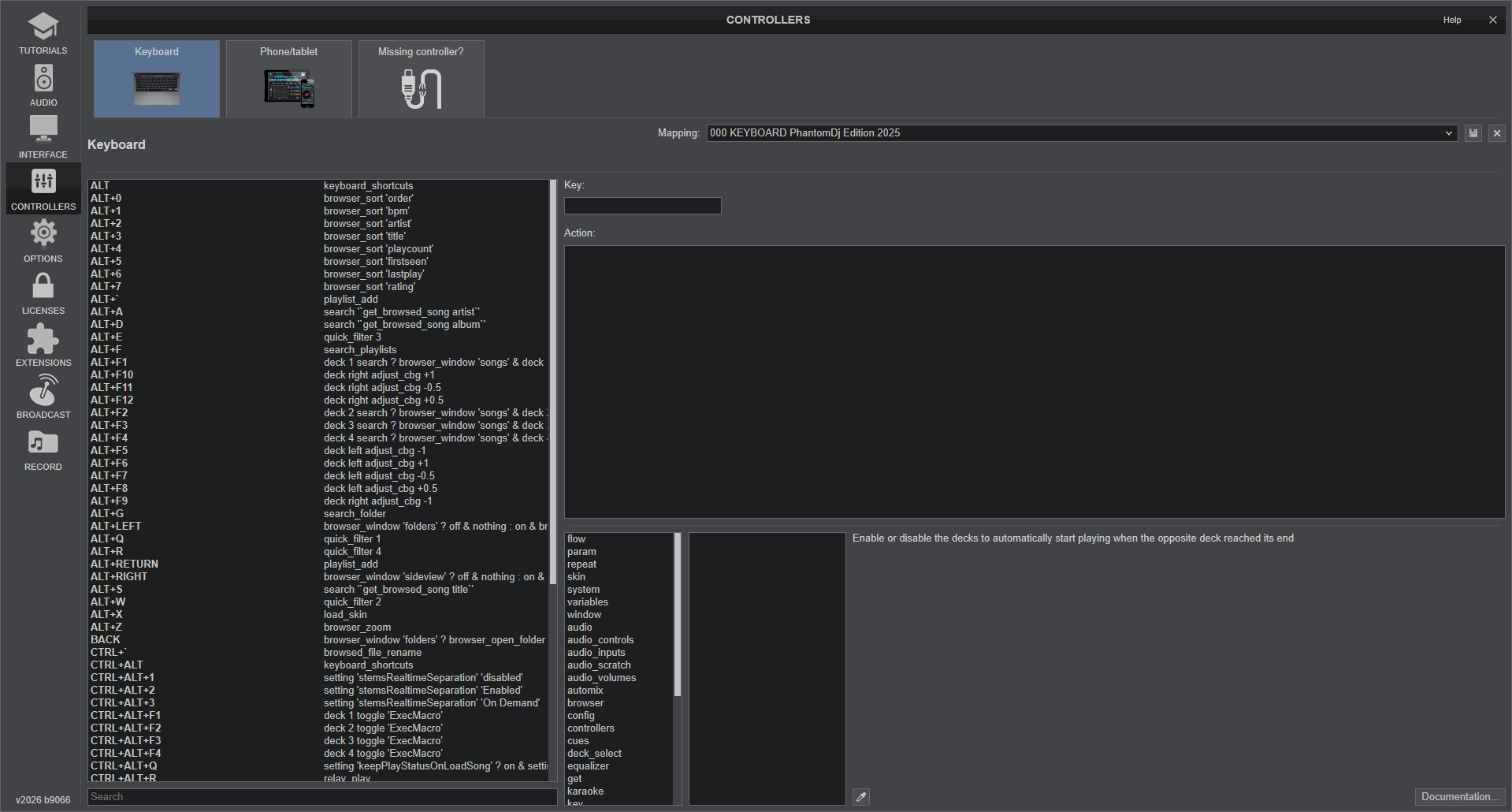
Settings window is resizable..
Settings window is resizable..
发表时间 Mon 19 Jan 26 @ 11:04 am
 locoDog
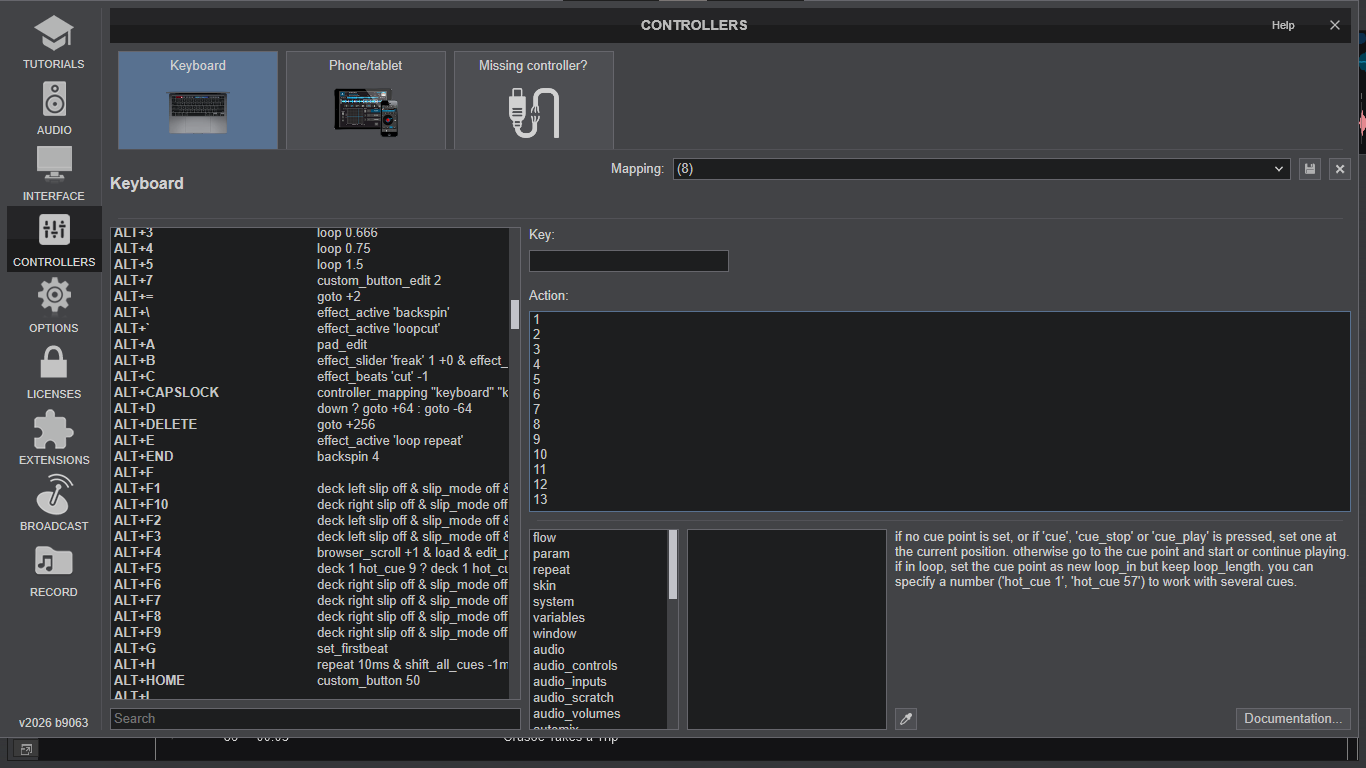
Must be a resolution thing, I'm stuck with 13 lines, likely 10-11 before I lose the condition hint
发表时间 Mon 19 Jan 26 @ 12:01 pm
 IIDEEJAYII
One can stretch the Controller's mapping window across 2 screens to max out the horizontal width.
This allows for me a total of, 2040 fully viewable characters, (and spaces), max, in the "Action" pane.
(it once was much larger before the larger controller icons were added to the top, decreasing the height of the Action pane)
Below is a screenshot, of the full screen, of one monitor, after stretching the non-editor parts, off to another monitor.
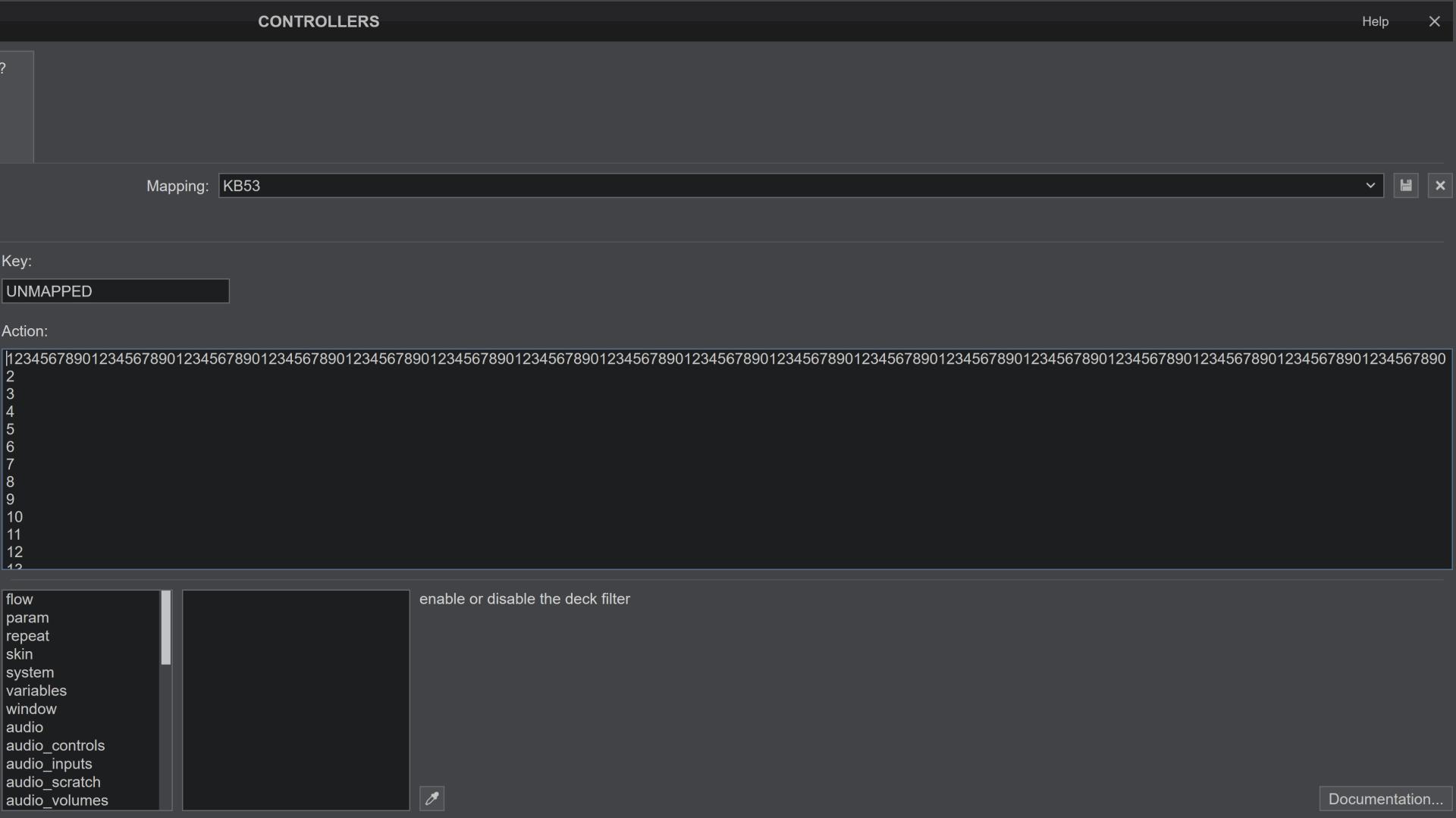
I would be so useful, (and amazing), if the Action pane was able to be resized vertically, (when needed).
Phantom, how do you get what appears to be about 21 lines vertically (almost double what I able to view)?
(the font resizing in VDJ does not affect the characters in the editor, seems to affect only the browser's characters)
Win 11
3840 X 2160 screen resolution
This allows for me a total of, 2040 fully viewable characters, (and spaces), max, in the "Action" pane.
(it once was much larger before the larger controller icons were added to the top, decreasing the height of the Action pane)
Below is a screenshot, of the full screen, of one monitor, after stretching the non-editor parts, off to another monitor.
I would be so useful, (and amazing), if the Action pane was able to be resized vertically, (when needed).
Phantom, how do you get what appears to be about 21 lines vertically (almost double what I able to view)?
(the font resizing in VDJ does not affect the characters in the editor, seems to affect only the browser's characters)
Win 11
3840 X 2160 screen resolution
发表时间 Mon 19 Jan 26 @ 12:34 pm
PhantomDeejay
DPI Scaling (of your monitor) matters.
My screenshot is at 1920x1080 @100% DPI Scaling
My screenshot is at 1920x1080 @100% DPI Scaling
发表时间 Mon 19 Jan 26 @ 1:42 pm
IIDEEJAYII
Are you using Windows?
I attempted to change the DPI scaling from the recommended 300% to 100% > many changes to Windows, but Edit Action pane remained unchanged
Also changed the display resolution from the recommended 3840 X 2160 to 920x1080 at different scalings, and it did not affect the Action pane.
also attempted to change the text size in the OS, also did not change the the Action pane font.
Is Action pane, font size, hard coded or is it a variable in the skin's xml ?
I attempted to change the DPI scaling from the recommended 300% to 100% > many changes to Windows, but Edit Action pane remained unchanged
Also changed the display resolution from the recommended 3840 X 2160 to 920x1080 at different scalings, and it did not affect the Action pane.
also attempted to change the text size in the OS, also did not change the the Action pane font.
Is Action pane, font size, hard coded or is it a variable in the skin's xml ?
发表时间 Mon 19 Jan 26 @ 2:40 pm
Yan Duval
@IIDEEJAYII. Yes, the rotaries are a bit stiff, have no center click and are smallish. The stiffness is not a problem for me, they are simply different. If you move slowly, the values changes slowly. If you move fast, it feels stiffer but the value changes much faster. The main advantage is that you can have several pages of buttons to change everything you’d like to change without having pots that are not aligned with the software controls. The faders are great too.
I partially implemented what is required to DJ with it and I prefer it to mouse and keyboard. However, it was a playlist played in the exact order, with auto synch. I still have to figure out how to replace the jog wheel and put together a track selection method.
I partially implemented what is required to DJ with it and I prefer it to mouse and keyboard. However, it was a playlist played in the exact order, with auto synch. I still have to figure out how to replace the jog wheel and put together a track selection method.
发表时间 Thu 22 Jan 26 @ 2:37 am
Yan Duval
@phantomdeejay,
I see 3 use cases. One similar to the existing Mk1 #1 template, one similar to the #2 template, and the third one being a complete controller. #1 and #2 can complement a controller, while #3 makes for a very portable one.
The Mk3 can be setup either in MIDI or DAW mode. Midi mode can be customized with the Components software but it has limitations: Limited custom text, special buttons unavailable, and most importantly for me, no pan mode for knobs.
Pan mode will put the LED blue when the knob is less than 63, white for 63-64 and yellow when the knob is right (or more than 64). It's important to have visual feedback since there is no center notch available. If colors can be customized, I would want to have the deck color when centered, a blue-white on the left and a yellow-white on the right, with varying intensity the further away from the center position. This will allow easy identification of non centered filters.
There are two DAW modes that can be used to easily switch from one configuration to another. I guess the track button can be used to change the layout within a config. An example could be to easily swap the pads for transport controls when the Mk3 is used as a controller.
I finally guess it's better to wait to know what are the available options before drawing configurations. To give an example: There is a play button. Is it possible to change it's LED color? This could allow to use it to start a specific deck. Another example would be the pan knobs. I think I read it's necessary to put an entire row in pan mode to use them.
I see 3 use cases. One similar to the existing Mk1 #1 template, one similar to the #2 template, and the third one being a complete controller. #1 and #2 can complement a controller, while #3 makes for a very portable one.
The Mk3 can be setup either in MIDI or DAW mode. Midi mode can be customized with the Components software but it has limitations: Limited custom text, special buttons unavailable, and most importantly for me, no pan mode for knobs.
Pan mode will put the LED blue when the knob is less than 63, white for 63-64 and yellow when the knob is right (or more than 64). It's important to have visual feedback since there is no center notch available. If colors can be customized, I would want to have the deck color when centered, a blue-white on the left and a yellow-white on the right, with varying intensity the further away from the center position. This will allow easy identification of non centered filters.
There are two DAW modes that can be used to easily switch from one configuration to another. I guess the track button can be used to change the layout within a config. An example could be to easily swap the pads for transport controls when the Mk3 is used as a controller.
I finally guess it's better to wait to know what are the available options before drawing configurations. To give an example: There is a play button. Is it possible to change it's LED color? This could allow to use it to start a specific deck. Another example would be the pan knobs. I think I read it's necessary to put an entire row in pan mode to use them.
发表时间 Thu 22 Jan 26 @ 4:55 am
PhantomDeejay
We have received a sample device and we are working on it.
Some things to keep in mind:
1) The unit will work in DAW mode* with VirtualDJ
2) You will be able to control the color of all the LEDs via VDJ script.
3) Yes, ALL the leds are RGB, including play button, page scrolling buttons e.t.c.. Only SHIFT and MODE buttons don't provide control over their leds
4) There is no "PAN" mode. That being said, each ROW of knobs can be set to absolute or relative mode. In other words it can work as a slider or as an encoder. You WILL be able to control that if you wish.
5) The way I see how this is going to end up, is that you won't be able to use the "native templates" and to be honest that's not their purpose. The "templates" are a means to control different external MIDI equipment via the DIN sockets, where all the processing of MIDI data happens on the device itself before sending out.
6) However you will be able to have multiple "pages/templates/functions". Just not via the RAW MIDI way of the device, but via VDJ Script
*Technically the device has 2 working modes. The stand alone mode and the DAW mode. VirtualDJ will use the DAW mode, as that mode gives full control over all the elements, including the screen.
Then the device has working "templates" which in DAW mode they are just a variable (device firmware does not change MIDI messages depending on current template)
There is a third mode of operation (HUI) as well, but it's much more limited than "DAW" mode, so there's no point to go that way.
Some things to keep in mind:
1) The unit will work in DAW mode* with VirtualDJ
2) You will be able to control the color of all the LEDs via VDJ script.
3) Yes, ALL the leds are RGB, including play button, page scrolling buttons e.t.c.. Only SHIFT and MODE buttons don't provide control over their leds
4) There is no "PAN" mode. That being said, each ROW of knobs can be set to absolute or relative mode. In other words it can work as a slider or as an encoder. You WILL be able to control that if you wish.
5) The way I see how this is going to end up, is that you won't be able to use the "native templates" and to be honest that's not their purpose. The "templates" are a means to control different external MIDI equipment via the DIN sockets, where all the processing of MIDI data happens on the device itself before sending out.
6) However you will be able to have multiple "pages/templates/functions". Just not via the RAW MIDI way of the device, but via VDJ Script
*Technically the device has 2 working modes. The stand alone mode and the DAW mode. VirtualDJ will use the DAW mode, as that mode gives full control over all the elements, including the screen.
Then the device has working "templates" which in DAW mode they are just a variable (device firmware does not change MIDI messages depending on current template)
There is a third mode of operation (HUI) as well, but it's much more limited than "DAW" mode, so there's no point to go that way.
发表时间 Thu 22 Jan 26 @ 8:13 am
Yan Duval
That’s great! Can’t wait to test it!
Yes, for sure DAW mode is the best if we have to choose.
A #4 use case would be a lighting controller. I’m no expert with this but the layout would meet my basic needs. I wonder if a pro could use it? If it’s the case, the MIDI mode would also be required since it’s the only one able to drive the DIN outputs. It’s not possible in DAW mode. User mode 16 has fixed CC to button assignment so it could be used as a starting point.
I don’t think providing the two modes can prove difficult since they are using different ports. Maybe it could be two devices in the controller selection. One is for DAW mode, the other for MIDI (RAW) mode. I don’t think the fact that they are mutually exclusive would be a problem for the user.
Thanks for clarifying the pan mode I confused with relative mode. I now just hope you provide us with a good example of matching the LED intensity to the absolute value of the knob. Although I understand Lab, XYZ and RGB color coordinates, I,m not too sure how to do it.
Yes, for sure DAW mode is the best if we have to choose.
A #4 use case would be a lighting controller. I’m no expert with this but the layout would meet my basic needs. I wonder if a pro could use it? If it’s the case, the MIDI mode would also be required since it’s the only one able to drive the DIN outputs. It’s not possible in DAW mode. User mode 16 has fixed CC to button assignment so it could be used as a starting point.
I don’t think providing the two modes can prove difficult since they are using different ports. Maybe it could be two devices in the controller selection. One is for DAW mode, the other for MIDI (RAW) mode. I don’t think the fact that they are mutually exclusive would be a problem for the user.
Thanks for clarifying the pan mode I confused with relative mode. I now just hope you provide us with a good example of matching the LED intensity to the absolute value of the knob. Although I understand Lab, XYZ and RGB color coordinates, I,m not too sure how to do it.
发表时间 Thu 22 Jan 26 @ 6:05 pm
Yan Duval
Hello!
I understand you guys have been pretty busy but…. Any progress with this Launchcontrol? I really miss the relative encoders that can be achieved only in DAW mode.
It doesn’t seem to be too hard to do, at least the minimum, but I know I can spend hours stuck since I don’t have much experience. So I’d rather help Atomix if it can be done. I could also use a partially finished device definition or the previous model definition to improve it, at least for my use, or to support your work.
Thanks in advance.
I understand you guys have been pretty busy but…. Any progress with this Launchcontrol? I really miss the relative encoders that can be achieved only in DAW mode.
It doesn’t seem to be too hard to do, at least the minimum, but I know I can spend hours stuck since I don’t have much experience. So I’d rather help Atomix if it can be done. I could also use a partially finished device definition or the previous model definition to improve it, at least for my use, or to support your work.
Thanks in advance.
发表时间 Sat 18 Apr 26 @ 6:03 pm
PhantomDeejay
It will be officially supported very soon.
However there are some bad news:
While in DAW mode you can't use SHIFT+ENCODER(s) for any operation.
The unit literally stops sending MIDI data when turning any encoder while SHIFT button is held down.
We have not found any way to bypass that. It seems a strange thing to have baked on firmware level, but it is what it is I guess..
However there are some bad news:
While in DAW mode you can't use SHIFT+ENCODER(s) for any operation.
The unit literally stops sending MIDI data when turning any encoder while SHIFT button is held down.
We have not found any way to bypass that. It seems a strange thing to have baked on firmware level, but it is what it is I guess..
发表时间 Sat 18 Apr 26 @ 10:18 pm
Yan Duval
Great thanks!
The shift+encoder is expected behavior if I understand correctly what you mean. It allows to figure out the value and the purpose of the encoder without changing it. You get the values displayed on the little screen.
This works well in Ableton Live, and I would be quite confused if it was to behave differently... You just get used to do this with the encoders and the faders.
If I didn't understand you and it's a different beahavior, here's the data with the first encoder. I did Turn RL - Hold SHIFT - Turn RL - Release Shift -Turn RL. Transmission on Channel 16 is stopped while Shift is depressed.

The shift+encoder is expected behavior if I understand correctly what you mean. It allows to figure out the value and the purpose of the encoder without changing it. You get the values displayed on the little screen.
This works well in Ableton Live, and I would be quite confused if it was to behave differently... You just get used to do this with the encoders and the faders.
If I didn't understand you and it's a different beahavior, here's the data with the first encoder. I did Turn RL - Hold SHIFT - Turn RL - Release Shift -Turn RL. Transmission on Channel 16 is stopped while Shift is depressed.
发表时间 Sun 19 Apr 26 @ 3:22 am
PhantomDeejay
In DAW mode, the "DAW" (in this case VirtualDJ) is in complete control of the screen.
So, what the screen shows is complementally dependent on the mapper, and not on the device firmware.
Now, If you put encoders on relative mode, there's no need for them to "catch" a virtual value. The encoders just send +/-1 values. In this mode, at least, one would expect that holding down SHIFT would not stop the encoders from sending messages. In fact all the controllers I have come across to this day, keep sending messages as before.
The same is true when the encoders are in absolute mode as well.
While in this case it does make sense to have a way where you can move an encoder to "catch up" with a virtual given value, usually this is handled by the software, or in rare cases by the firmware, but by other means.
It is the first time I have seen a controller stop sending MIDI messages when a button (SHIFT) is kept pressed down.
That being said, the device is almost ready for release. It's just a matter of fine tuning the factory default mapper, and support should come within the next couple days.
I just thought I should let you know of what I consider a major limitation on the way you can map the device.
For instance, one of the initial mapping plans for the device was to have one column of encoders control the 3 effect slots parameters.
The initial thought was that the encoder in first row would control Effect 1 Slider 1 when unshifted, and Effect 1 Slider 2 when shift kept being pressed.
Obviously that's not possible, and that's a major limitation.
Therefore the default mapping will have to be more simple and streamlined.
And if you try to remap it (which I guess you would) you would have to keep that detail in mind :)
So, what the screen shows is complementally dependent on the mapper, and not on the device firmware.
Now, If you put encoders on relative mode, there's no need for them to "catch" a virtual value. The encoders just send +/-1 values. In this mode, at least, one would expect that holding down SHIFT would not stop the encoders from sending messages. In fact all the controllers I have come across to this day, keep sending messages as before.
The same is true when the encoders are in absolute mode as well.
While in this case it does make sense to have a way where you can move an encoder to "catch up" with a virtual given value, usually this is handled by the software, or in rare cases by the firmware, but by other means.
It is the first time I have seen a controller stop sending MIDI messages when a button (SHIFT) is kept pressed down.
That being said, the device is almost ready for release. It's just a matter of fine tuning the factory default mapper, and support should come within the next couple days.
I just thought I should let you know of what I consider a major limitation on the way you can map the device.
For instance, one of the initial mapping plans for the device was to have one column of encoders control the 3 effect slots parameters.
The initial thought was that the encoder in first row would control Effect 1 Slider 1 when unshifted, and Effect 1 Slider 2 when shift kept being pressed.
Obviously that's not possible, and that's a major limitation.
Therefore the default mapping will have to be more simple and streamlined.
And if you try to remap it (which I guess you would) you would have to keep that detail in mind :)
发表时间 Sun 19 Apr 26 @ 2:53 pm
Yan Duval
Great to hear that it's close to release!
I understand what you mean, but it's not a matter of doing catchup. There are so many encoders that it's easy to forget which one does what. If they were touch sensitive, you would touch one to see what it's controllilng and it's actual value without beging forced to turn the encoder and modify that value. Insttead, you press shift and this replaces touch sensitive encoders. I personally like that. There are no other buttons that could be used as a "normal" shift, like the Novation extra button?
I understand what you mean, but it's not a matter of doing catchup. There are so many encoders that it's easy to forget which one does what. If they were touch sensitive, you would touch one to see what it's controllilng and it's actual value without beging forced to turn the encoder and modify that value. Insttead, you press shift and this replaces touch sensitive encoders. I personally like that. There are no other buttons that could be used as a "normal" shift, like the Novation extra button?
发表时间 Mon 20 Apr 26 @ 2:16 am
PhantomDeejay
Yan Duval wrote :
There are no other buttons that could be used as a "normal" shift, like the Novation extra button?
That would be up to each user.
The "novation" button is available to remap.
However since the unit already has a button named "Shift" it would not make sense for us to use another button in order to provided "shifted" operations.
One nice thing about LCXL3 is that it has RGB leds below the knobs.
Therefore color coding them, helps to remember where is what.
Anyway, the device should now be supported on the next VirtualDJ update.
An operation manual describing the 2 basic templates will come in the next 2 to 3 days.
However my guess is that most "power" users that are likely to get such a unit will most likely remap it to meet their specific needs.
PS:
The two DAW modes/templates (Control and Mixer) provide full access on all elements of the unit.
The rest modes (user 1 to 16) provide basic control even if the unit is "unlocked" by VirtualDJ and has entered DAW operation.
Therefore I would avoid to map something on those modes, unless someone has some very special needs that I can't think of.
If someone wants to have more than 2 templates then my advice would be to use a software variable (like '$LCXL3Page' to create his different templates.
However, my advise is just this. An advice. Technically there's no problem to use the built-in "user" modes if someone doesn't mind the limited functionality offered in these modes.
发表时间 Mon 20 Apr 26 @ 10:48 pm
IIDEEJAYII
@Phantom, awesome work !!
Could you comment on the build quality (feel and durability) of the unit, maybe comparing to, say some standard DJ Controller, say the DDJ Flex10's sliders, or the knobs of a Midi Fighter Twister ?
Interested to see the mapper, and the possibilities, though I probably do not need to purchase one, it does look very interesting.
Is it possible to map LED intensity to reflect values of the encoders, giving possibly visual feedback of the encoder's position?
I know I am probably maybe expecting too much.
(the Midi Fighter Twister has Ring LEDs for encoder position)
Could you comment on the build quality (feel and durability) of the unit, maybe comparing to, say some standard DJ Controller, say the DDJ Flex10's sliders, or the knobs of a Midi Fighter Twister ?
Interested to see the mapper, and the possibilities, though I probably do not need to purchase one, it does look very interesting.
Is it possible to map LED intensity to reflect values of the encoders, giving possibly visual feedback of the encoder's position?
I know I am probably maybe expecting too much.
(the Midi Fighter Twister has Ring LEDs for encoder position)
发表时间 Tue 21 Apr 26 @ 8:42 am
PhantomDeejay
The LEDs are RGB. However they offer only some predefined colors.
There are enough of them to claim that the unit can display "any" color, but since they are distinct colors it's not easy to have the leds intensity change with the value of the encoder (or it's assigned function)
I mean you can get 3/4 different "shades" of red as an instance. They are ok to have a "full" and a "dimmed" red state, but not ok to linearly fade between black and full red.
On the bright side, you can control each led via VDJscript which means that you can tell a led to have different colors depending on value, or operation e.t.c.
For instance the factory default mapper has the leds at 100% intensity when in 50% (middle position) and at 50% intensity on all other positions, but the color of each encoder depends on its function.
Finally don't forget that there's a screen built in, that once you move a slider/encoder it will update to show you the related info.
The screen is also fully customizable via VDJscript, which means that if you want to get your hands dirty you could show any personalized info you may like there.
As for the build quality:
It's nice. It doesn't feel cheap at all. However the encoders are not designed for fast manipulation. They offer a good amount of resistance, which is ok for what the unit was meant to be used: Precise setting of mixer/DAW values.
They are also ok to be used for EQ/Stems control as long as you prefer doing long smooth transitions.
If you're used in "cutting" the EQ with a simple twist, then LCXL3 is not for you.. :P
The "pads" are not pads obviously, and you shouldn't use them as such. They are recessed buttons that need some "effort" to press. This is nice since it prevents accidental presses e.t.c. However it limits the ways you can use them as they are not designed with "fast operation" in mind.
Finally, what I love about it, is it's profile. It has a very nice profile and it doesn't feel bulky or a toy.
My only worry is what's going to happen in 10 years.. I mean the knobs e.t.c. are made of a nice plastic material, but since it's not hard plastic, I'm not sure if it's going to get polymerized or not.
PS: I can live without it, but I really miss an ON/OFF switch. When the DAW (VirtualDJ) disconnects, the unit reverts to one of the "user" templates, and all the leds turn on. Then if you shut down your PC, those leds stay on (assuming your PC still provides power through the USB port, most modern PCs do).
That's not a big deal for a normal PC, but for a laptop it could drain your battery and therefore you must always remember to disconnect it from the USB port.
There are enough of them to claim that the unit can display "any" color, but since they are distinct colors it's not easy to have the leds intensity change with the value of the encoder (or it's assigned function)
I mean you can get 3/4 different "shades" of red as an instance. They are ok to have a "full" and a "dimmed" red state, but not ok to linearly fade between black and full red.
On the bright side, you can control each led via VDJscript which means that you can tell a led to have different colors depending on value, or operation e.t.c.
For instance the factory default mapper has the leds at 100% intensity when in 50% (middle position) and at 50% intensity on all other positions, but the color of each encoder depends on its function.
Finally don't forget that there's a screen built in, that once you move a slider/encoder it will update to show you the related info.
The screen is also fully customizable via VDJscript, which means that if you want to get your hands dirty you could show any personalized info you may like there.
As for the build quality:
It's nice. It doesn't feel cheap at all. However the encoders are not designed for fast manipulation. They offer a good amount of resistance, which is ok for what the unit was meant to be used: Precise setting of mixer/DAW values.
They are also ok to be used for EQ/Stems control as long as you prefer doing long smooth transitions.
If you're used in "cutting" the EQ with a simple twist, then LCXL3 is not for you.. :P
The "pads" are not pads obviously, and you shouldn't use them as such. They are recessed buttons that need some "effort" to press. This is nice since it prevents accidental presses e.t.c. However it limits the ways you can use them as they are not designed with "fast operation" in mind.
Finally, what I love about it, is it's profile. It has a very nice profile and it doesn't feel bulky or a toy.
My only worry is what's going to happen in 10 years.. I mean the knobs e.t.c. are made of a nice plastic material, but since it's not hard plastic, I'm not sure if it's going to get polymerized or not.
PS: I can live without it, but I really miss an ON/OFF switch. When the DAW (VirtualDJ) disconnects, the unit reverts to one of the "user" templates, and all the leds turn on. Then if you shut down your PC, those leds stay on (assuming your PC still provides power through the USB port, most modern PCs do).
That's not a big deal for a normal PC, but for a laptop it could drain your battery and therefore you must always remember to disconnect it from the USB port.
发表时间 Tue 21 Apr 26 @ 9:12 am
IIDEEJAYII
Thanks for the awesomely described details, and overveiw, of the Lauchcontrol XL3, from a DJs point of view.
Priceless.. info
Priceless.. info
发表时间 Tue 21 Apr 26 @ 9:57 am
Yan Duval
I agree with Phantom and would like to add to his comment.
I think you can change the encoders acceleration, or at least the number of steps per turn, so this mitigates the EQ slamming problem (that I don't have myself).
I like the faders, they are similar to my FLX4's
The only issue I have is true for all encoders I think: there is no tactile feedback to know that you are at the 12 o'clock position. It forces you to look at what you are doing.! Eventually, I guess someone will add haptic feedback so you could sense a click with your fingers when you are centered.
I think you can change the encoders acceleration, or at least the number of steps per turn, so this mitigates the EQ slamming problem (that I don't have myself).
I like the faders, they are similar to my FLX4's
The only issue I have is true for all encoders I think: there is no tactile feedback to know that you are at the 12 o'clock position. It forces you to look at what you are doing.! Eventually, I guess someone will add haptic feedback so you could sense a click with your fingers when you are centered.
发表时间 Tue 21 Apr 26 @ 12:39 pm
PhantomDeejay
The "EQ slamming" not being easy derives from the stiffness of the encoders, not from their acceleration curve.
Indeed you can change how sensitive they are (via the firmware options), but you can't change how "hard" they are to move, aka how much they resist on movement.
And IMHO their resistance is very nice for blending house music, but terrible if you want to use them for "battle style" operation.
Indeed you can change how sensitive they are (via the firmware options), but you can't change how "hard" they are to move, aka how much they resist on movement.
And IMHO their resistance is very nice for blending house music, but terrible if you want to use them for "battle style" operation.
发表时间 Tue 21 Apr 26 @ 3:13 pm
