


 djmazmarkallen
After I record using VDJ, when i place the recorded file into vdj player it won't load the whole mp3 file....any ideas .....
thanks
thanks
发表时间 Mon 08 Sep 08 @ 3:53 pm
 wildcountryclub
if its a really long file then you need to go into the config menu - options - and change the max load settings. that should do it. mine is set to always and works pretty good.
发表时间 Mon 08 Sep 08 @ 7:45 pm
 Bob Fauci DJ
I tried the setting you gave (Always) and the recording length will not go past 7:22.. any other suggestions! Bob
发表时间 Thu 11 Sep 08 @ 4:12 pm
 spinnaJ
Hi bob, is there much space left in ur hdd that u recorded it in? Insufficient space that lead to that.
发表时间 Thu 11 Sep 08 @ 4:14 pm
Bob Fauci DJ
Plenty of room on the hard drive. Tried to mix 2 songs together & record them & the recording length was 14 min. When I went to play it back it would only play the 7 min and 22 sec of the mix.
Very frustrating seems like their should be a solution. Thanks for your ideas.
Bob
Very frustrating seems like their should be a solution. Thanks for your ideas.
Bob
发表时间 Thu 11 Sep 08 @ 7:48 pm
Jsandman17
ok i have a problem. ive recorded 2 mixtapes with record function.
they recorded fine except the made the entire set into one big track
by big i mean 40 mins long.
i need some help
thanks
they recorded fine except the made the entire set into one big track
by big i mean 40 mins long.
i need some help
thanks
发表时间 Thu 11 Sep 08 @ 8:20 pm
 fatkatzdj
Bob Fauci DJ wrote :
Plenty of room on the hard drive. Tried to mix 2 songs together & record them & the recording length was 14 min. When I went to play it back it would only play the 7 min and 22 sec of the mix.
Very frustrating seems like their should be a solution. Thanks for your ideas.
Bob
Very frustrating seems like their should be a solution. Thanks for your ideas.
Bob
Check you recording config option. It sounds like it's set to auto separate or split.
发表时间 Thu 11 Sep 08 @ 9:57 pm
fatkatzdj
Jsandman17 wrote :
ok i have a problem. ive recorded 2 mixtapes with record function.
they recorded fine except the made the entire set into one big track
by big i mean 40 mins long.
i need some help
thanks
they recorded fine except the made the entire set into one big track
by big i mean 40 mins long.
i need some help
thanks
and you need to do the opposite as above. Check the recording config as well.
发表时间 Thu 11 Sep 08 @ 10:00 pm
fatkatzdj
the set up will also determine the mix output. If your using an external mixer but it doesn't sound like your using one.
发表时间 Thu 11 Sep 08 @ 10:02 pm
 LIMOL
LIMOL
Good morning
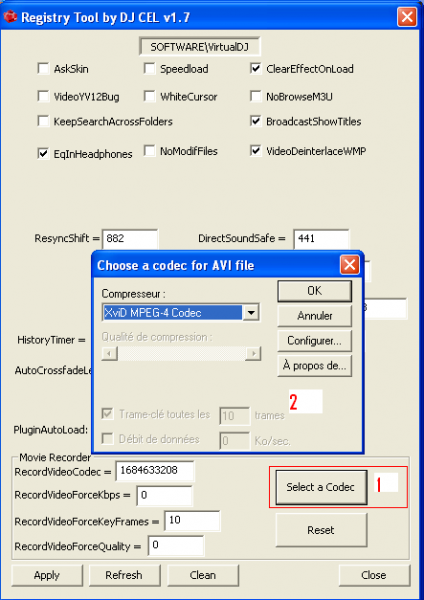
dll for the registration default is buggy.
1) download xvidvfw.dll v1.1.3 fixed by DJ CEL -> https://virtualdj.com/addons/view.html?type=tool
Simply copy of this dll DJCEL and place it in C: / Windows / System32 and overwrites the previous one.
dll for the registration default is buggy.
1) download xvidvfw.dll v1.1.3 fixed by DJ CEL -> https://virtualdj.com/addons/view.html?type=tool
Simply copy of this dll DJCEL and place it in C: / Windows / System32 and overwrites the previous one.
发表时间 Fri 12 Sep 08 @ 4:32 am
Bob Fauci DJ
The https://virtualdj.com/addons/view.html?type=tool did not work can you put the correct link back....so I can try it...Thanks...Bob
发表时间 Tue 16 Sep 08 @ 6:54 am
Bob Fauci DJ
looks like we still need help with this problem, does anyone else have any ideas/suggestions? Would REALLY like to be able to record using Virtual & I know others have had success. I am desperate!
发表时间 Wed 17 Sep 08 @ 4:21 pm
LIMOL
发表时间 Thu 18 Sep 08 @ 9:27 am
Bob Fauci DJ
I tried the Registry tool by DJ Cell...and I still have the same problem....will not play back recording over 8 mins of audio...Thanks for trying....any other ideas..
发表时间 Fri 19 Sep 08 @ 7:08 pm
fatkatzdj
is it just with the personal recorded songs or is it with everything thats over a certain lenght? Try putting in a really long song or movie clip. If it plays then it is the record dll if it doesn't then you have a different problem. Have you tried reinstalling VDJ for verification. And you have looked and checked the options in config to always and in record config.
发表时间 Fri 19 Sep 08 @ 7:42 pm
Bob Fauci DJ
When I try to record (audio/music).... I can record it 10-15-20-30 mins.....Play back...it will only play 7 to 8 mins. of the audio. I have checked config...it is set for (Aways)... I have reinstalled VDJ... So far I get the same problem....I don't know much about the record dll...I need more help with (record dll).....Maybe that will fix my problem.. Thanks Bob
发表时间 Sat 20 Sep 08 @ 7:00 am
 DJ Access no1
just anaylse the recorded file... right click the file u recorded, click BPM and click anaylze techno/house or you can click analyze other.
after you done that, reload the track back onto the same deck, or put it onto the other one and the full file length shud be there.
after you done that, reload the track back onto the same deck, or put it onto the other one and the full file length shud be there.
发表时间 Sun 21 Sep 08 @ 6:57 am
Bob Fauci DJ
Yes I did try re-analyising my recording....and it gave me more play back time....before the longest song recording would be 7mins on play back....now I can record over 1 hour and play it back........I did try 2 hour recording time but it would not play the whole recording back..still not perfect but it is better then no recording...
I would like to record my show and then go back and hear my mixes...
thanks for the help.. Bob
I would like to record my show and then go back and hear my mixes...
thanks for the help.. Bob
发表时间 Thu 25 Sep 08 @ 9:46 am
Bob Fauci DJ
any other things I should try....still trying to fix my problem...Thanks!
发表时间 Sat 27 Sep 08 @ 8:05 pm