


 Benz Werner
How can I open this window using a custom button?
What is the command?
What is the command?
发表时间 Wed 16 Sep 26 @ 10:55 am
 Stephane Clavel
 Best Answer
the latest EA build (b9642) also has a "ShoutOut..." entry in the menu of the sideview sampler.
Best Answer
the latest EA build (b9642) also has a "ShoutOut..." entry in the menu of the sideview sampler.(useful for people using a custom skin without custom buttons).
Or if you have a custom skin that kept the custom buttons, as said before, click on an empty custom button and enter "shoutout" in the command prompt.
发表时间 Sat 19 Sep 26 @ 8:40 am[ selected best answer by Stephane Clavel on Sat 19 Sep 26 @ 8:40 am ]
 kradcliffe
发表时间 Wed 16 Sep 26 @ 11:13 am
Benz Werner
kradcliffe wrote :
https://virtualdj.com/forums/270133/General_Discussion/Shoutout_and_AI_scripting.html
Thanks for the tip, but I can't find a command there that opens the window.
The "shoutout" command set up as a custom button doesn't open the window.
发表时间 Wed 16 Sep 26 @ 11:40 am
 groovindj
I guess you're typing it into the natural language window. Switch to the script window.
Two buttons on the right. Top is natural. Bottom is script.
Two buttons on the right. Top is natural. Bottom is script.
发表时间 Wed 16 Sep 26 @ 11:51 am
Benz Werner
Why doesn't ShoutOut open with this command?
skin_panel 'shoutout' ? skin_panel 'shoutout' off : skin_panel 'shoutout' on
skin_panel 'shoutout' ? skin_panel 'shoutout' off : skin_panel 'shoutout' on
发表时间 Wed 16 Sep 26 @ 3:35 pm
Adion
Because it's not a skin panel
发表时间 Wed 16 Sep 26 @ 3:39 pm
Benz Werner
Adion wrote :
Because it's not a skin panel
What should the command for a custom button look like?
发表时间 Wed 16 Sep 26 @ 5:05 pm
kradcliffe
Just create a custom button with shoutout. Simple as that.
发表时间 Wed 16 Sep 26 @ 5:10 pm
Benz Werner
kradcliffe wrote :
Just create a custom button with shoutout. Simple as that.
Unfortunately, that doesn't work!
发表时间 Wed 16 Sep 26 @ 5:18 pm
 locoDog
show a picture where you're typing.
发表时间 Wed 16 Sep 26 @ 5:19 pm
kradcliffe
Are you using the second button down on the right?
The top one is for AI script generation and I don't think it recognises the command yet.
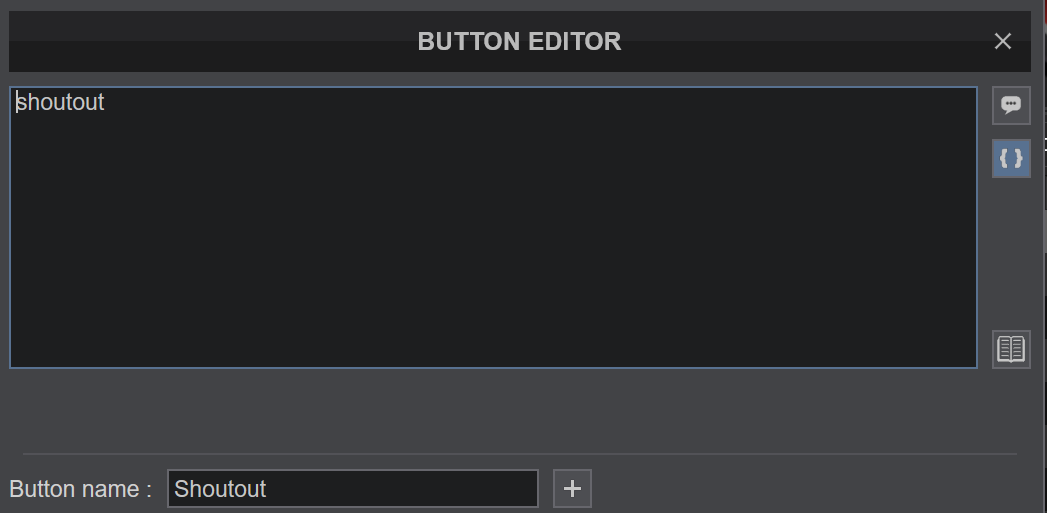
The top one is for AI script generation and I don't think it recognises the command yet.
发表时间 Wed 16 Sep 26 @ 5:21 pm
Benz Werner
I've been doing it this way the whole time, and suddenly it actually works.
发表时间 Wed 16 Sep 26 @ 5:27 pm
groovindj
kradcliffe wrote :
Are you using the second button down on the right?
That's what I said earlier...
Maybe that selection should be flipped, so that the old method is default?
发表时间 Wed 16 Sep 26 @ 5:28 pm
 djcel
djcel
It is written:
"Describe what you want this button to do" for the first one
and
"Enter a VDJScript command" for the second one
By default, a DJ shouldn't be an IT guy so natural language should be the standard in the future.
"Describe what you want this button to do" for the first one
and
"Enter a VDJScript command" for the second one
By default, a DJ shouldn't be an IT guy so natural language should be the standard in the future.
发表时间 Wed 16 Sep 26 @ 7:24 pm
 Sebastian Noel
This is what worked for me to map a custom on-screen (skin) button.
In the AI prompt window, I typed:
“Map this button to open the window that lets me enter text to be converted to audio using the new shoutout feature.”
Hope this helps
In the AI prompt window, I typed:
“Map this button to open the window that lets me enter text to be converted to audio using the new shoutout feature.”
Hope this helps
发表时间 Thu 17 Sep 26 @ 3:54 pm
 DJ VinylTouch
@Sebastian we'll talk later about it.
As @groovindj and I said, the devs changed the default input type to me natural language conversion, that's why the vdjscript direct input didn't work.
As @groovindj and I said, the devs changed the default input type to me natural language conversion, that's why the vdjscript direct input didn't work.
发表时间 Thu 17 Sep 26 @ 4:03 pm
groovindj
The text that DJCEL mentions is written faintly in the box, but vanishes once text is entered.
I think it would be helpful to make it more obvious which mode the window is in. Write "Natural Text" or "VDJ Script" in the top bar, or underneath the window (above the save button).
It's often the case in VDJ that buttons are shown without any label.
I think it would be helpful to make it more obvious which mode the window is in. Write "Natural Text" or "VDJ Script" in the top bar, or underneath the window (above the save button).
It's often the case in VDJ that buttons are shown without any label.
发表时间 Thu 17 Sep 26 @ 4:18 pm
kradcliffe
It is still early access so tweaks can be made before full release if necessary.
发表时间 Thu 17 Sep 26 @ 5:09 pm
Stephane Clavel
the AI should now reconize a valid script entered in the natural language window and use it unmodified.
发表时间 Fri 18 Sep 26 @ 11:49 am
groovindj
Thanks, that makes a lot of sense.
It's similar to how I talk to my smart speakers. I will just use a key word if I can, rather than a whole sentence. It saves time and is still understood.
It's similar to how I talk to my smart speakers. I will just use a key word if I can, rather than a whole sentence. It saves time and is still understood.
发表时间 Fri 18 Sep 26 @ 1:01 pm
