


 crounsa810
I'm losing it with this thing. I have a lot of trance tracks that drift a bunch and I used to just set beat anchors when they changed. With the update to fluid, I can't do that anymore and the fluid anchors are seemingly impossible to deal with. I know, I can hit shift and move the beat anchors but what do I do when it won't let me move the beat anchor back to where it needs to be? It ultimately ends up moving it too far down or adding a bunch of extra beats in the space while still not letting me move it to where it needs to be. It's incredibly frustrating, especially when the fluid beat analysis generally picks up the downbeat halfway into the phrase. There should be an option to do rigid, fluid, or to do your own multiple beat anchor grid. Am I just missing something obvious to fix this?
发表时间 Tue 21 Jul 26 @ 5:54 am
 DJ VinylTouch
All described under the BPM Editor section of the User Manual.
There is no option to re-analyze a subsection though (AFAIK there never was..might be nice to have if not too mich effort).
- Yes it did change from how it behaved in the past
- Anchors are added/deleted through the right-click of the waveform (on a measure bar line mark)
- Anchors are moved by holding down shift and dragging them
You may have to drag a measure bar line in the zone after that anchor to correct the BPM there - Rigid/Fluod analysis choice is show in the editor as well
There is no option to re-analyze a subsection though (AFAIK there never was..might be nice to have if not too mich effort).
发表时间 Tue 21 Jul 26 @ 12:43 pm
crounsa810
It's incredibly annoying that they didn't put in an option to manually edit fluid tracks. I hope they roll that out in an update soon. For instance, I just analyzed Go Back - John Summit and Sub Focus and it has a regular house beat then goes into drum n bass. I cannot do rigid because there's an adjustment, but when I do fluid the beat anchors are so screwed up that even when I delete a bunch of the unnecessary ones, I can't move the anchors to be where they need to be. Adding new anchors also doesn't do it right. It was much easier when I was able to just go "ok, this has multiple tempo changes, let me just add the beat markers where I need them." So stupid that they made it such a headache to get that done. It needs to be fixed.
发表时间 Sun 26 Jul 26 @ 8:19 pm
DJ VinylTouch
Once again, there is a way to edit the beatgrid, including moving the anchor - read the manual, come back if you have questions.
Yea, they changed the way to do it, but it doesn't mean it can't be done.
Feel free to free to ask the devs why they made the change (I don't actually know why they did that, but I assume it helps with the fluid implementation), but there really is no fix to request (it's also been like half a year since this change, and this was discussed in depth in other posts).
Yea, they changed the way to do it, but it doesn't mean it can't be done.
Feel free to free to ask the devs why they made the change (I don't actually know why they did that, but I assume it helps with the fluid implementation), but there really is no fix to request (it's also been like half a year since this change, and this was discussed in depth in other posts).
发表时间 Sun 26 Jul 26 @ 8:25 pm
crounsa810
Like how is this helpful? I used to be able to go "ok, first section is 136, last section is 174"
I could add two anchors and align the grids and be done in less than a minute. Now I'm 30 minutes into editing this grid because the analysis adds a ton of useless anchors that I have to delete, but also won't let me add anchors, and any attempts I make just throw off the beats even more. It's so annoying and they need to fix it. Keep fluid for those who like it, but let us have a third option to do it ourselves.
I could add two anchors and align the grids and be done in less than a minute. Now I'm 30 minutes into editing this grid because the analysis adds a ton of useless anchors that I have to delete, but also won't let me add anchors, and any attempts I make just throw off the beats even more. It's so annoying and they need to fix it. Keep fluid for those who like it, but let us have a third option to do it ourselves.
发表时间 Sun 26 Jul 26 @ 8:28 pm
crounsa810
DJ VinylTouch wrote :
Once again, there is a way to edit the beatgrid, including moving the anchor - read the manual, come back if you have questions.
Yea, they changed the way to do it, but it doesn't mean it can't be done.
Feel free to free to ask the devs why they made the change (I don't actually know why they did that, but I assume it helps with the fluid implementation), but there really is no fix to request (it's also been like half a year since this change, and this was discussed in depth in other posts).
Yea, they changed the way to do it, but it doesn't mean it can't be done.
Feel free to free to ask the devs why they made the change (I don't actually know why they did that, but I assume it helps with the fluid implementation), but there really is no fix to request (it's also been like half a year since this change, and this was discussed in depth in other posts).
Yes, and I've followed those directions but when I right click there is not an option to add an anchor. It just gives me an option to delete all, or shift down a beat where it is still wrong. If I could just delete the anchors and add my own like it says I can, that'd be fine but I literally cannot. There is no option to do so.
发表时间 Sun 26 Jul 26 @ 8:30 pm
DJ VinylTouch
I'm on your side it was easier to do the work before, but they changed it (Perhaps you can ask them why?).
So you should be able to add anchors on measure lines (unlike before, the anchor was freely placeable wherever the playhead was), and now moving an anchor requires holding shift. I believe the issue with adding too many anchors in zones has already been brought up a few times already.
If you can't add an anchor somewhere, then probably give the example.
So you should be able to add anchors on measure lines (unlike before, the anchor was freely placeable wherever the playhead was), and now moving an anchor requires holding shift. I believe the issue with adding too many anchors in zones has already been brought up a few times already.
If you can't add an anchor somewhere, then probably give the example.
发表时间 Sun 26 Jul 26 @ 8:37 pm
crounsa810

These are the only options it gives when I right click. I can delete all anchors, then it lets me have the add anchor option, but I can only add one before the option is gone again. It seems like unless I go in and adjust the beat grid to match every single beat, I can't edit this song to be where it needs to be. Needs drastic fixing.
发表时间 Sun 26 Jul 26 @ 8:45 pm
DJ VinylTouch
Where did you right click (on a measure line or within a measure)? What does clicking "Add Beat" do?
发表时间 Sun 26 Jul 26 @ 8:50 pm
crounsa810
DJ VinylTouch wrote :
Where did you right click (on a measure line or within a measure)? What does clicking "Add Beat" do?
I clicked on a measure line. When I click add beat it doesn't seem to actually do anything either.
Also am I not able to change the fluid tempo? When it's drifting off because it reads it as 173.2 but it's actually 174. Overall this whole fluid stuff is more of a headache than it's worth
发表时间 Sun 26 Jul 26 @ 9:05 pm
DJ VinylTouch
So you do have to hover the mouse over the measure line, and when you ser the pointer turn into the cross, a roght-click should contain the Add Anchor entry.
发表时间 Sun 26 Jul 26 @ 9:46 pm
 locoDog
Ok my procedure for that track
first go to rigid, get that first beat spot on the first audible sample
use the zoom cheat trick
squash the window tiny, zoom all the way in, drag the window size as wide as possible
@devs can we just get per sample zoom without ^these^ tricks
scan as fluid, delete everything,
pull the grid till you get it to 136.000,
a custom button named
`get_bpm & param_cast '0.000'
to actually see more that 1 rounded decimal place
now the first down beat of the long break that piano stab, sit there and goto +64
you want an anchor where this lands on beat
then you want to
goto +96
wherever this lands you want to drag that back to the drum & bass drop
that'll give you a bpm of 153.957,
make than an anchor
back end drag the bpm after the d&b drop till you get 174.000
that middle section isn't 153.957, but it is 96 beats with an increasing tempo
if you want to grid that speed up section, I'm not the man to ask
but I think you'd just be shift dragging 96 beats into ~there-abouts position
it's just a first beat and 2 anchors.
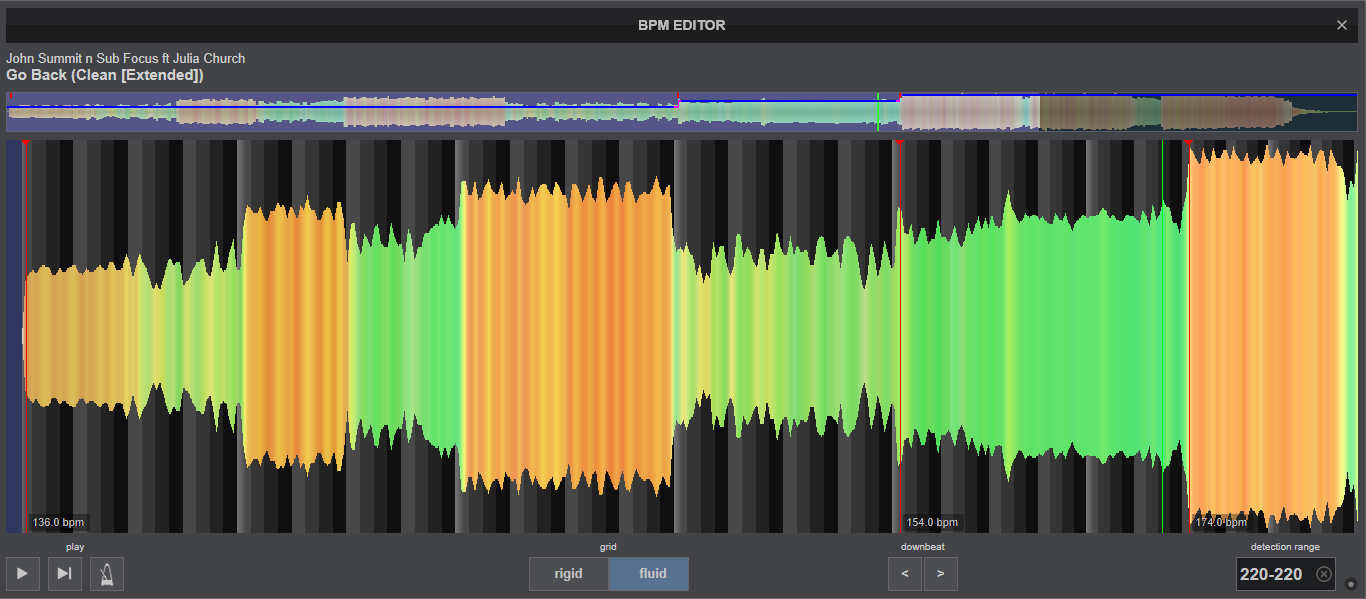
first go to rigid, get that first beat spot on the first audible sample
use the zoom cheat trick
squash the window tiny, zoom all the way in, drag the window size as wide as possible
@devs can we just get per sample zoom without ^these^ tricks
scan as fluid, delete everything,
pull the grid till you get it to 136.000,
a custom button named
`get_bpm & param_cast '0.000'
to actually see more that 1 rounded decimal place
now the first down beat of the long break that piano stab, sit there and goto +64
you want an anchor where this lands on beat
then you want to
goto +96
wherever this lands you want to drag that back to the drum & bass drop
that'll give you a bpm of 153.957,
make than an anchor
back end drag the bpm after the d&b drop till you get 174.000
that middle section isn't 153.957, but it is 96 beats with an increasing tempo
if you want to grid that speed up section, I'm not the man to ask
but I think you'd just be shift dragging 96 beats into ~there-abouts position
it's just a first beat and 2 anchors.
发表时间 Sun 26 Jul 26 @ 10:45 pm