


 BlueberryAlien
Not sure what I did. Either way in advanced EQ mode I set it to ezremix and then Enabled keep frequency EQs on inner channel. But the outer channel doesnt display the ezremix eq. It apply audio changes but it only shows what it does on the inner channel... it transforms into deck 3 channel whenever i adjust sliders on deck 3, but deck 3 channel doesny properly display the names of the ezremix EQ. It used to work back then but Ive tried a lot of things and now I wanna do this again but somehow it is broken now.
发表时间 Sat 11 Jul 26 @ 9:40 pm
IIDEEJAYII
I can confirm that the Frequency and Stems are not working, as expected with EZRemix and ModernEQ when in Dual mode.
(only the Stems Full, 5 stem mode works as expected with the stems and Frequency EQs where they should be, and both apply EQs to the inner decks)
The EZRemix and ModernEQ both have the Frequency EQs reversed from the expected (and pictured in popup) location, AND the outter knobs are not affecting the inner deck as expected.
below is screenshot of Freq EQs configured to be on inner channels in setup:
(and pictured for deck 2)
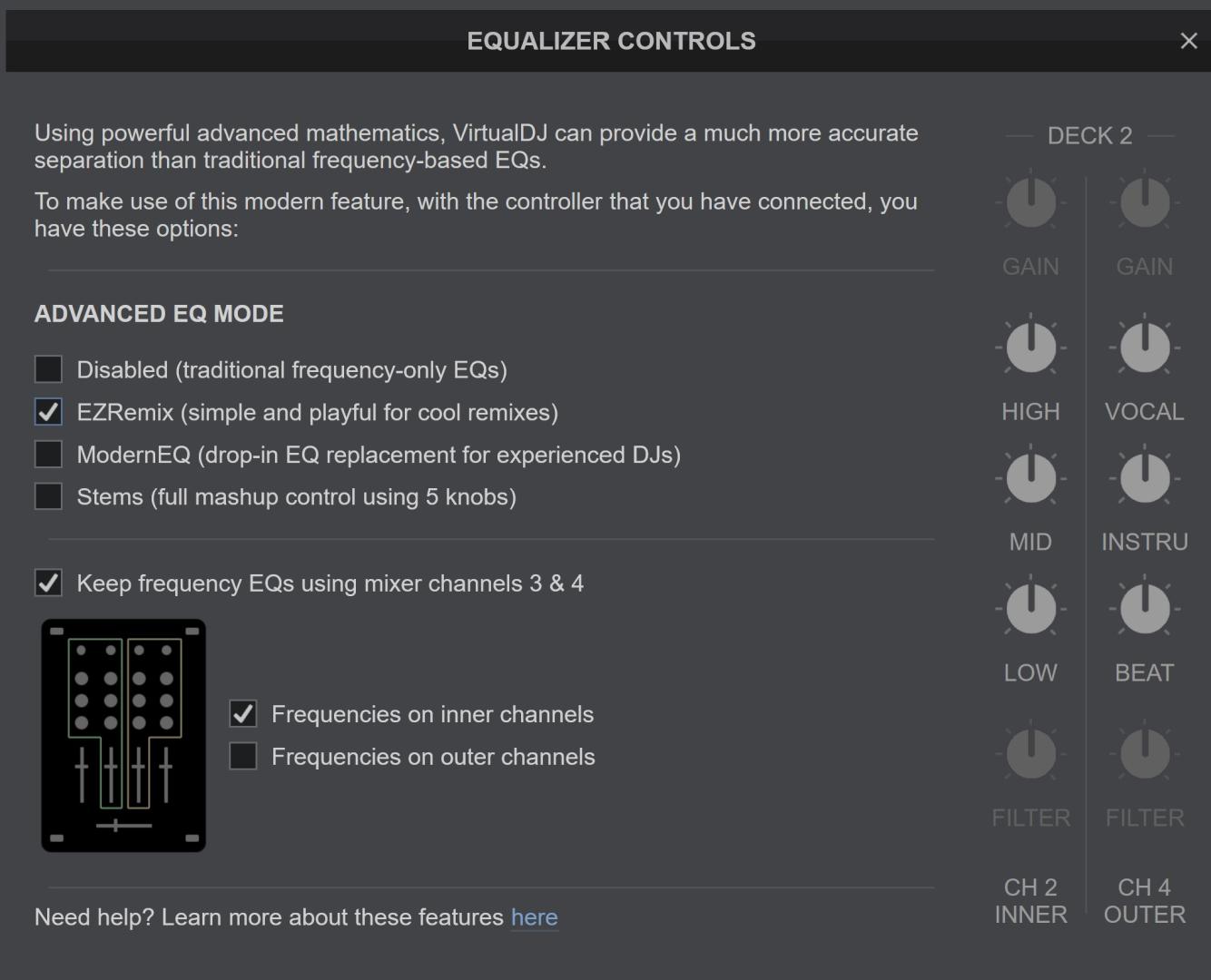
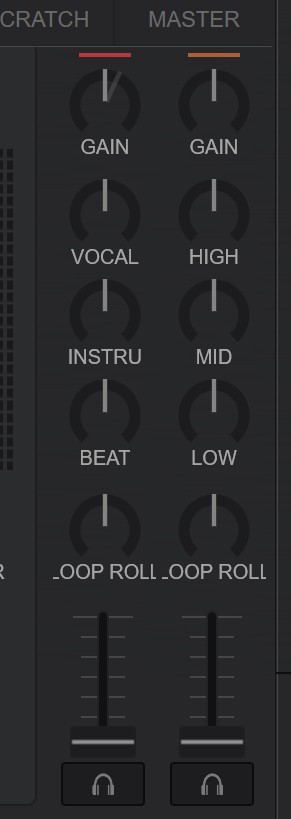
and screenshot of skin (deck 2) showing Freq EQs actually on outter channels (REVERSED)
(also outter channels not operating on expected inner deck, deck 2)
(deck 2 loaded w track with stems 2, and same image if deck 4 is, loaded or not, w stems 2 track)
Setting eqModeDual = Outer
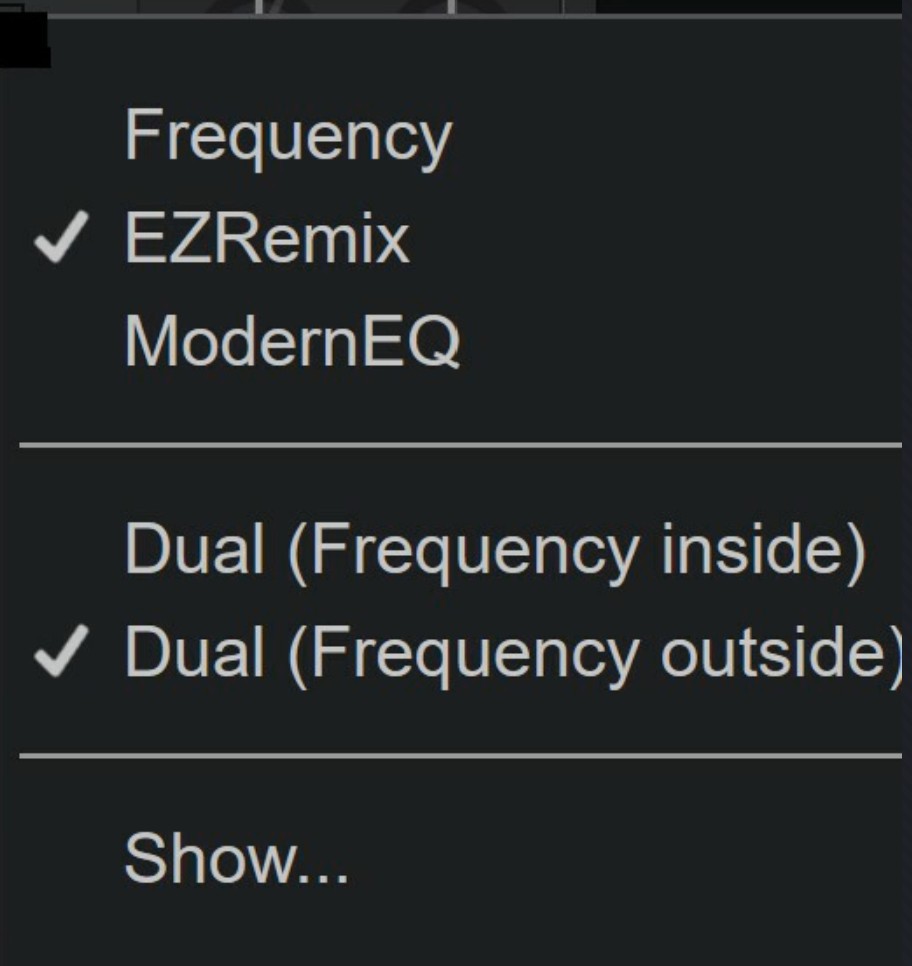
All 3 images are of same configuration, no changes.
Tested with default Pro skin
9482
Note: dont understand, just reporting, (in case it is helpful to the understanding)
that initially all 4 channels were displaying Stems when say "Freq on inner channels" was selected
AND
all 4 channels would toggle to displaying Freq EQs when "Freq on outter channels" check box was selected.
since this stopped happening don't remember which caused which.
AND again the Full Stems, (5 stem setup) worked as expected.
(only the Stems Full, 5 stem mode works as expected with the stems and Frequency EQs where they should be, and both apply EQs to the inner decks)
The EZRemix and ModernEQ both have the Frequency EQs reversed from the expected (and pictured in popup) location, AND the outter knobs are not affecting the inner deck as expected.
below is screenshot of Freq EQs configured to be on inner channels in setup:
(and pictured for deck 2)
and screenshot of skin (deck 2) showing Freq EQs actually on outter channels (REVERSED)
(also outter channels not operating on expected inner deck, deck 2)
(deck 2 loaded w track with stems 2, and same image if deck 4 is, loaded or not, w stems 2 track)
Setting eqModeDual = Outer
All 3 images are of same configuration, no changes.
Tested with default Pro skin
9482
Note: dont understand, just reporting, (in case it is helpful to the understanding)
that initially all 4 channels were displaying Stems when say "Freq on inner channels" was selected
AND
all 4 channels would toggle to displaying Freq EQs when "Freq on outter channels" check box was selected.
since this stopped happening don't remember which caused which.
AND again the Full Stems, (5 stem setup) worked as expected.
发表时间 Sun 12 Jul 26 @ 5:10 am
BlueberryAlien
So it's a replicable and unfixable bug? Damn
发表时间 Sun 12 Jul 26 @ 7:03 am
IIDEEJAYII
If it's the same as you experienced, which means its reproducible.
And it most likely will be fixed super quickly by the amazing VDJ devs.
And it most likely will be fixed super quickly by the amazing VDJ devs.
发表时间 Sun 12 Jul 26 @ 10:19 pm
 DJ VinylTouch
This works fine for me and my DDJ-FLX10.
What is the value of your setting mixerOrder?
How you see the EQs displayed will depend on that. The default (3124) will do what you expect, I suspect you have it set to 1342.
What is the value of your setting mixerOrder?
How you see the EQs displayed will depend on that. The default (3124) will do what you expect, I suspect you have it set to 1342.
发表时间 Sun 12 Jul 26 @ 11:29 pm
BlueberryAlien
I had the default one
发表时间 Mon 13 Jul 26 @ 2:32 am
BlueberryAlien
It's still doing it. I dont know why. Mixer order is correct. It just decides to do some weird shit on the skin
发表时间 Wed 15 Jul 26 @ 3:25 pm
BlueberryAlien
Here's a video
streamable.com/wv9su6
Expires in 2 days
streamable.com/wv9su6
Expires in 2 days
发表时间 Wed 15 Jul 26 @ 3:36 pm
IIDEEJAYII
May not be the only issue, have you tested with the default controller mapping?
Appears that maybe the EQ_LOW mapping may have changed.
(the default mapping is: eq_low )
-----------------
and in the controller's mapper, What is selected in the "Deck's" panel at the top?
My Denon MC7000 has "Automatic (1,2,3,4)"
with no option there to select say 3,1,2,4, which is the setting option, set as is yours.
Appears that maybe the EQ_LOW mapping may have changed.
(the default mapping is: eq_low )
-----------------
and in the controller's mapper, What is selected in the "Deck's" panel at the top?
My Denon MC7000 has "Automatic (1,2,3,4)"
with no option there to select say 3,1,2,4, which is the setting option, set as is yours.
发表时间 Thu 16 Jul 26 @ 4:47 am
DJ VinylTouch
So I'm not sure what is to be gained from that video - we're watching the skin and some manipulations/custom buttons and we really have no idea what is being done on the controller/what mappings may or may not have been changed.
To start, all of that needs to be explained, and OP should also test with default settings (including the controller mapping) to make sure OP is testing how things are mapped by default.
All I simply did was connect the controller to my Mac, and tested those same Stems EQ settings with the default mixer order and other mixer orders, with the default skin (I believe it was the Pro variant) showing the mixer for all 4 channels, and the switching of the EQ panels section for each deck functioned as expected in every case.
To start, all of that needs to be explained, and OP should also test with default settings (including the controller mapping) to make sure OP is testing how things are mapped by default.
All I simply did was connect the controller to my Mac, and tested those same Stems EQ settings with the default mixer order and other mixer orders, with the default skin (I believe it was the Pro variant) showing the mixer for all 4 channels, and the switching of the EQ panels section for each deck functioned as expected in every case.
发表时间 Thu 16 Jul 26 @ 4:55 am
IIDEEJAYII
@DJ VinylTouch
Yes I agree, and I don't use this feature since wish to use all 4 decks and channels.
And it once worked, when I tested when stems first were available, and now when attempting to test, with default Pro skin and default controller mapping there seems to be some unexpected behavior.
Again not of interest to me as a user, just attempting to help VDJ where a possible change in behavior may have been introduced. And of course assist fellow DJs to have the best experience.
The video showed that the test was done with Custom mapping. Wishing to help troubleshoot and eliminate that variable.
What is your Deck's set to in the controller mapping ?
As it could be controller specific in my case.
PS
have been busy to make a video.
also wanted to test with default setting.xml also, which I have not done.
Yes I agree, and I don't use this feature since wish to use all 4 decks and channels.
And it once worked, when I tested when stems first were available, and now when attempting to test, with default Pro skin and default controller mapping there seems to be some unexpected behavior.
Again not of interest to me as a user, just attempting to help VDJ where a possible change in behavior may have been introduced. And of course assist fellow DJs to have the best experience.
The video showed that the test was done with Custom mapping. Wishing to help troubleshoot and eliminate that variable.
What is your Deck's set to in the controller mapping ?
As it could be controller specific in my case.
PS
have been busy to make a video.
also wanted to test with default setting.xml also, which I have not done.
发表时间 Thu 16 Jul 26 @ 5:07 am
DJ VinylTouch
IIDEEJAYII wrote :
And it once worked, when I tested when stems first were available, and now when attempting to test, with default Pro skin and default controller mapping there seems to be some unexpected behavior.
What's the unexpected behavior you get?
IIDEEJAYII wrote :
What is your Deck's set to in the controller mapping ?
What is your Deck's set to in the controller mapping ?
Not sure I understand the question. I'm using the factory default mapping for the DDJ-FLX10, which also seems to be what OP is using, except it looks like OP's using Windows.
TBH I don't see what gain there is to disable outer channel use with a software mixing based controller (unless you want stem and frequency manipulation simultaneously, which is even more niche), given you can actually change each channel's mixer mode fully/without having hardware functionality being applied on top, but this is OPs use case, so yes we are trying to help him with that (or to understand what is happening). This kind of use case was most likely created for external/onboard mixers with 4 channela, when you only really need two.
发表时间 Thu 16 Jul 26 @ 5:33 am
BlueberryAlien
DJ VinylTouch wrote :
TBH I don't see what gain there is to disable outer channel use with a software mixing based controller (unless you want stem and frequency manipulation simultaneously, which is even more niche)
Yes exactly I want to use EZRemix and Frequencies at the same time, because I often have to manipulate both simultaneaously. It's somewhat doable with just an EQ toggle but it's too clunky when I need to use both at the same time.
发表时间 Thu 16 Jul 26 @ 8:00 am
BlueberryAlien
DJ VinylTouch wrote :
So I'm not sure what is to be gained from that video - we're watching the skin and some manipulations/custom buttons and we really have no idea what is being done on the controller/what mappings may or may not have been changed.
Apologies. I am only manipulating the low sliders on both channel 1 and 3. Twisting channel 1 you see the behavior ir normal, and twisting channel 3 you see that it actually displays the changes on channel 1 for some reason and also changes the slider names. So physical manipulation done on channel 3, but displays and clones itself on channel 1 instead. Using both at the same time causes infighting. You can see Im using channel 3 low slider when it's only a ghost slider and doesnt pickup. Deck order 3124
发表时间 Thu 16 Jul 26 @ 8:07 am
DJ VinylTouch
I had a bit of a play with the settings before heading off to work.
What I found this time around
I get the feeling that the EZRemix and ModernEQ Advanced EQ Modes are behaving, at least in this case, as all or nothing changes, especially ad eq_mode +1 doesn't seem to switch to them (they are expected to be applied on all channels separately), but they should work like how Full Stems EQ works in Dual Mode, especially as the EQ dialog gives them as options for that workflow.
What I found this time around
- Advanced EQ mode = Stems does the right thing (No Dual EQ Mode, Outer and Inner - the mixer label view and manipulations are correct)
- Other Advanced EQ modes (not Stem EQ) have unpredictable behavior in Dual EQ Modes, outer and inner)
When I tried EZRemix on Sunday, it seemingly did the right thing for the dual modes (quick mixer panel display check and functionality check on one channel).
My new trials shows the panels often being reversed and the EQ controls controlling the same deck (i.e. EQs of 2 and 4 control deck two, swapping the type of EQ when the control for a channel is moved), as OP said - The mapping for SHIFT_LED_PFl (not eq_mode frequency) operates incorrectly for the dual mode case in some sense
All the PFL LEDs flash now (I guess it's because the check is saying the general mode is not frequency, which is true, but if you have a channel set to manipulate freuqency that's not quiet correct). - SHIFT_PFL turns EQ mode dual off (as expected from the mapping), and handles each channel functionality separately and correctly
I get the feeling that the EZRemix and ModernEQ Advanced EQ Modes are behaving, at least in this case, as all or nothing changes, especially ad eq_mode +1 doesn't seem to switch to them (they are expected to be applied on all channels separately), but they should work like how Full Stems EQ works in Dual Mode, especially as the EQ dialog gives them as options for that workflow.
发表时间 Thu 16 Jul 26 @ 2:44 pm
IIDEEJAYII
DJ VinylTouch wrote :
Not sure I understand the question. I'm using the factory default mapping for the DDJ-FLX10, which also seems to be what OP is using, except it looks like OP's using Windows.
IIDEEJAYII wrote :
What is your Deck's set to in the controller mapping ?
What is your Deck's set to in the controller mapping ?
Not sure I understand the question. I'm using the factory default mapping for the DDJ-FLX10, which also seems to be what OP is using, except it looks like OP's using Windows.
Referring to the Decks displayed, in the Controllers Mapping window:
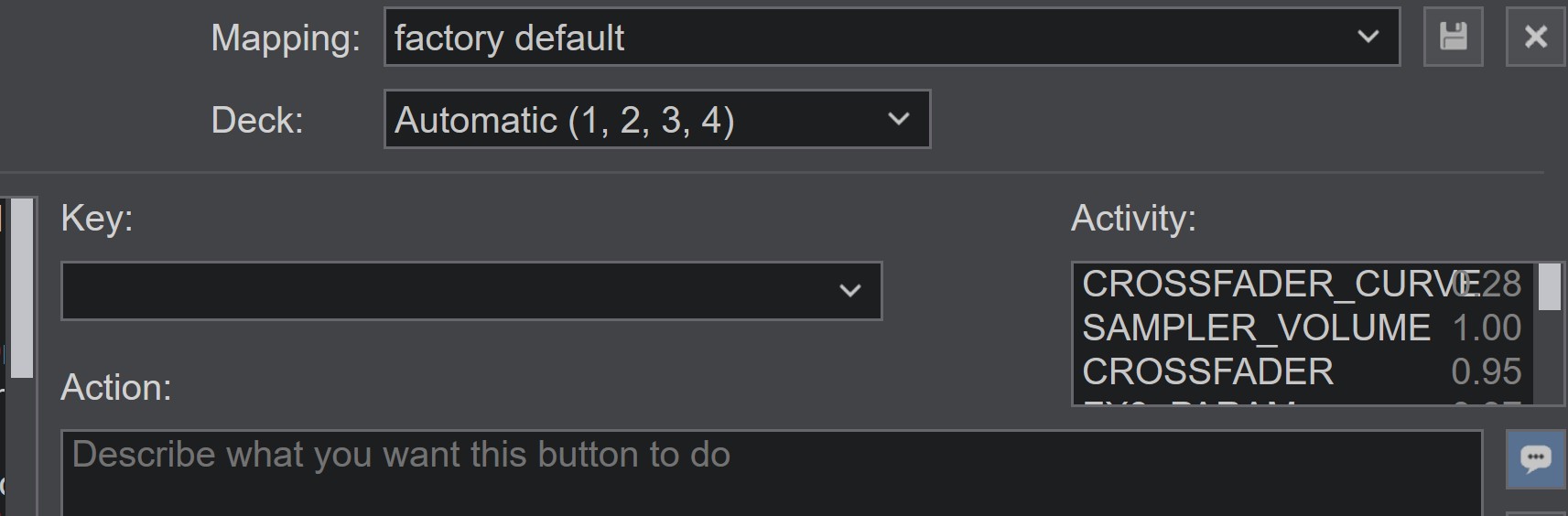
I am unable to change to say a 3, 1, 2, 4 deck order to match the
setting: mixerOrder

wondered if this was maybe a part of the issue.
发表时间 Fri 17 Jul 26 @ 6:51 am
IIDEEJAYII
@BLUEBERRYALIEN
Were you able to test with the default mapping for your controller?
Were you able to test with the default mapping for your controller?
发表时间 Fri 17 Jul 26 @ 6:59 am
DJ VinylTouch
IIDEEJAYII wrote :
Referring to the Decks displayed, in the Controllers Mapping window:
I am unable to change to say a 3, 1, 2, 4 deck order to match the
setting: mixerOrder
...
wondered if this was maybe a part of the issue.
Referring to the Decks displayed, in the Controllers Mapping window:
I am unable to change to say a 3, 1, 2, 4 deck order to match the
setting: mixerOrder
...
wondered if this was maybe a part of the issue.
Thanks for supplying that info - no I didn't change that (I honestly don't ever change that setting from default because the controllers I use don't it).
There is definitely an issue though - went into some of the details in the previous post.
发表时间 Fri 17 Jul 26 @ 1:52 pm
 PhantomDeejay
It doesn't matter if the MIXER ORDER is 3124 or 1234
The deck assignment on mappers tab should always be 1,2,3,4
Then you can use the MIXER ORDER setting to change the mixer if you like.
But (I repeat) the mixer order is irrelevant to deck assignment on controllers tab..
The deck assignment on mappers tab should always be 1,2,3,4
Then you can use the MIXER ORDER setting to change the mixer if you like.
But (I repeat) the mixer order is irrelevant to deck assignment on controllers tab..
发表时间 Fri 17 Jul 26 @ 8:26 pm
DJ VinylTouch
Yep I never change the deck assignment on the Controllers tab, and my original assessment was just describing a possible option to check.
On further thought it's not clear if mixerOrder has proper meaning for EQ dual modes scenarios, because outer and inner seems to imply a left side right side split for the decks (and probably imply 2 channel mixing with decks 1 and 2), but you could have mixerOrder = 1234.
On further thought it's not clear if mixerOrder has proper meaning for EQ dual modes scenarios, because outer and inner seems to imply a left side right side split for the decks (and probably imply 2 channel mixing with decks 1 and 2), but you could have mixerOrder = 1234.
发表时间 Fri 17 Jul 26 @ 8:46 pm
