


 djDajuan
I've reset VDJ. When using the DDJ-REV5 to activate FX on the right side (FX2-1, FX2-2, FX2-3), the output doesn't match the selection in the UI. It might be a mapping issue, as the UI doesn't indicate that the FX2 is being used.
If I press the UI button, the output is as expected.
The controller functions as expected on the left side (FX1-1, etc.). The UI follows the controller button press and outputs the expected FX selection.
Can you help me with this?
If I press the UI button, the output is as expected.
The controller functions as expected on the left side (FX1-1, etc.). The UI follows the controller button press and outputs the expected FX selection.
Can you help me with this?
发表时间 Tue 14 Apr 26 @ 5:25 pm
 DJ VinylTouch
Please read the effects section of the manual for the DDJ Rev 5: https://virtualdj.com/manuals/hardware/pioneer/ddjrev5/layout/effects.html
Summary = the FX buttons you see represent a total of 6 software effects that are usable on any deck st a particular time (the same 6 is normally selected for both decks). To see what is enabled for FX on side 2, you'll have to enable the 6 FX panel view.
Those buttons do not represent a side of deck enablement.
This matchea how it works in Serato - Serato doesn't have per deck effects, it has effect units for which audio can be run through - you can run audio from any deck through either effect unit (effect unit 1 and effect unit 2), meaning a total of 6 effects (3 from unit 1, 3 from unit 2) can be applied at a given time.
Summary = the FX buttons you see represent a total of 6 software effects that are usable on any deck st a particular time (the same 6 is normally selected for both decks). To see what is enabled for FX on side 2, you'll have to enable the 6 FX panel view.
Those buttons do not represent a side of deck enablement.
This matchea how it works in Serato - Serato doesn't have per deck effects, it has effect units for which audio can be run through - you can run audio from any deck through either effect unit (effect unit 1 and effect unit 2), meaning a total of 6 effects (3 from unit 1, 3 from unit 2) can be applied at a given time.
发表时间 Tue 14 Apr 26 @ 5:34 pm
djDajuan
I'm familiar with how they work in both Serato and Rekordbox. I've also already read the DDJ-REV5 manual.
I'm using the Performance Layout with the Effects rack visible. I see all six FX. I'm asking for help because the mapping on FX2-1, FX2-2, and FX-3 seems to be incorrect. The output doesn't match what's selected in the UI. The UI doesn't indicate that any of the FX2 are being engaged.
Note: I already completely reset VDJ. No customizations made on my part.
I'm using the Performance Layout with the Effects rack visible. I see all six FX. I'm asking for help because the mapping on FX2-1, FX2-2, and FX-3 seems to be incorrect. The output doesn't match what's selected in the UI. The UI doesn't indicate that any of the FX2 are being engaged.
Note: I already completely reset VDJ. No customizations made on my part.
发表时间 Tue 14 Apr 26 @ 5:56 pm
 locoDog
You're obviously not familiar with how it works with vdj. Read the manual.
发表时间 Tue 14 Apr 26 @ 6:34 pm
djDajuan
locoDog wrote :
You're obviously not familiar with how it works with vdj. Read the manual.
Quite possibly. Could you be a bit more specific?
Listen, I re-read this page several times: https://virtualdj.com/manuals/hardware/pioneer/ddjrev5/layout/effects.html
What am I missing?
发表时间 Tue 14 Apr 26 @ 7:31 pm
DJ VinylTouch
I pretty much explained what the page is telling you.
Read th VirtualDJ User Manual page to find out how to change to the 6FX slots display for a deck:
https://virtualdj.com/manuals/virtualdj/interface/decks/decksadvanced/effects.html
After you have done that, re-read my post, as well as the effects section of the hardware manual page, then try going through pressing each FX button in sequence (1-3 on the right side, 1-3 on the left side), activate each on both decks using the paddles, and see what happens on the skin for each deck.
Read th VirtualDJ User Manual page to find out how to change to the 6FX slots display for a deck:
https://virtualdj.com/manuals/virtualdj/interface/decks/decksadvanced/effects.html
After you have done that, re-read my post, as well as the effects section of the hardware manual page, then try going through pressing each FX button in sequence (1-3 on the right side, 1-3 on the left side), activate each on both decks using the paddles, and see what happens on the skin for each deck.
发表时间 Tue 14 Apr 26 @ 7:36 pm
 PhantomDeejay
The FX buttons on the "right side" enable slots 4 to 6 to be triggered by the paddles. They DON'T correspond to slots 1-3 of the "right deck"
So, set up your VirtualDJ GUI to show 6 effect slots and you should be able to understand how the buttons work.
So, set up your VirtualDJ GUI to show 6 effect slots and you should be able to understand how the buttons work.
发表时间 Tue 14 Apr 26 @ 7:36 pm
djDajuan
PhantomDeejay wrote :
The FX buttons on the "right side" enable slots 4 to 6 to be triggered by the paddles. They DON'T correspond to slots 1-3 of the "right deck"
So, set up your VirtualDJ GUI to show 6 effect slots and you should be able to understand how the buttons work.
So, set up your VirtualDJ GUI to show 6 effect slots and you should be able to understand how the buttons work.
Thank you. Maybe I'm not explaining this well enough. I'm using the Performance skin with the effects rack showing. All six FX options are visible. All six have a different effect assigned to them.
I'm not asking about left or right deck. I'm not confused about which deck the FX can be applied to (the paddle handle that).
I am experiencing a problem where the FX on the right side (FX2-1, FX2-2, FX2-3), or, as you put it, FX 4-6, are not outputting the displayed effect.
发表时间 Tue 14 Apr 26 @ 7:58 pm
DJ VinylTouch
Maybe post a screenshot and/or video of the skin layout you are using with the controller (in particular showing the effects section)?
Also supply any other info that is helpful:
Also supply any other info that is helpful:
- OS being used and version level
- VirtualDJ Version
发表时间 Tue 14 Apr 26 @ 8:21 pm
DJ VinylTouch
Btw none of the Performance skin variants for the default skin show the the 6 FX slot setup and the FX racks for the default skin doesn't show it either (I got home to check first before making the claim).
AFAIK only the Pro variant has the option to show it within the decks, or other third-party skins.
AFAIK only the Pro variant has the option to show it within the decks, or other third-party skins.
发表时间 Tue 14 Apr 26 @ 10:01 pm
djDajuan
DJ VinylTouch wrote :
Btw none of the Performance skin variants for the default skin show the the 6 FX slot setup and the FX racks for the default skin doesn't show it either (I got home to check first before making the claim).
AFAIK only the Pro variant has the option to show it within the decks, or other third-party skins.
AFAIK only the Pro variant has the option to show it within the decks, or other third-party skins.
I created a video screen capture using Loom. Hopefully this helps:
https://www.loom.com/share/e34ddd5789844909a8ca5c93c11ed553
发表时间 Wed 15 Apr 26 @ 1:31 am
DJ VinylTouch
Based on the video, it proves you didn't fully comprehend what we said/didn't probably read the effects section of the manual.
In VirtualDJ, each deck has its own effects module (unlike Serato, which has 2 universal effects modules shared amongst all decks, which can host up to 6 effects - 3 per module). What you showed, in all cases, was the 3 effect layout (i.e. each deck was showing its 1st three effects). The effects rack also switches to show the first 3 effects of the deck in question that is being shown (it can switch, for instance, on deck inversion when selecting decks 3 and 4 from a 4 deck controller).
That means, in all deck cases, based on the setup you showed, you are just seeing the 1st three effects for each deck.
If you were actually viewing all 6 effects, it would look like this (this was taken from the same manual page provided to you):
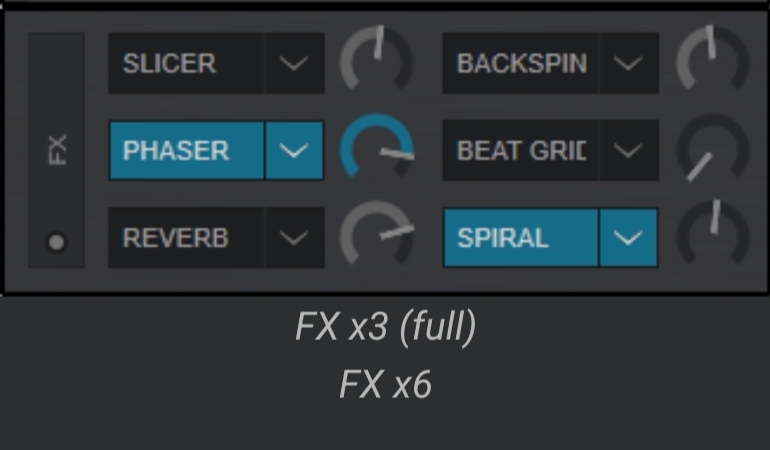
And that is only (currently) available if you switch to the Pro layout (or use a 3rd party skin that shows all 6 in a rack from the Extensions), enable and then select the 6 effect layout for the deck.
What we are saying is, the right side of the controller's FX1, FX2 and FX3 will enable/arm the slots 4, 5 and 6 for all decks in question, and the paddle will activate those slots for the deck in question (the paddles are deck specific).
In VirtualDJ, each deck has its own effects module (unlike Serato, which has 2 universal effects modules shared amongst all decks, which can host up to 6 effects - 3 per module). What you showed, in all cases, was the 3 effect layout (i.e. each deck was showing its 1st three effects). The effects rack also switches to show the first 3 effects of the deck in question that is being shown (it can switch, for instance, on deck inversion when selecting decks 3 and 4 from a 4 deck controller).
That means, in all deck cases, based on the setup you showed, you are just seeing the 1st three effects for each deck.
If you were actually viewing all 6 effects, it would look like this (this was taken from the same manual page provided to you):
And that is only (currently) available if you switch to the Pro layout (or use a 3rd party skin that shows all 6 in a rack from the Extensions), enable and then select the 6 effect layout for the deck.
What we are saying is, the right side of the controller's FX1, FX2 and FX3 will enable/arm the slots 4, 5 and 6 for all decks in question, and the paddle will activate those slots for the deck in question (the paddles are deck specific).
发表时间 Wed 15 Apr 26 @ 1:58 am
 groovindj
I can understand the frustration here though. It should be plug & play.
This is not the first time the issue has come up.
Either the skin needs an option to switch between 123 and 456 so the right side FX slots are 456, or it needs to be rewritten to display the correct slots when the REV5 is connected.
In the meantime, perhaps one of our skin experts could tweak it for you.
This is not the first time the issue has come up.
Either the skin needs an option to switch between 123 and 456 so the right side FX slots are 456, or it needs to be rewritten to display the correct slots when the REV5 is connected.
In the meantime, perhaps one of our skin experts could tweak it for you.
发表时间 Wed 15 Apr 26 @ 9:59 am
djDajuan
DJ VinylTouch wrote :
Based on the video, it proves you didn't fully comprehend what we said/didn't probably read the effects section of the manual.
In VirtualDJ, each deck has its own effects module (unlike Serato, which has 2 universal effects modules shared amongst all decks, which can host up to 6 effects - 3 per module). What you showed, in all cases, was the 3 effect layout (i.e. each deck was showing its 1st three effects). The effects rack also switches to show the first 3 effects of the deck in question that is being shown (it can switch, for instance, on deck inversion when selecting decks 3 and 4 from a 4 deck controller).
That means, in all deck cases, based on the setup you showed, you are just seeing the 1st three effects for each deck.
If you were actually viewing all 6 effects, it would look like this (this was taken from the same manual page provided to you):
And that is only (currently) available if you switch to the Pro layout (or use a 3rd party skin that shows all 6 in a rack from the Extensions), enable and then select the 6 effect layout for the deck.
What we are saying is, the right side of the controller's FX1, FX2 and FX3 will enable/arm the slots 4, 5 and 6 for all decks in question, and the paddle will activate those slots for the deck in question (the paddles are deck specific).
In VirtualDJ, each deck has its own effects module (unlike Serato, which has 2 universal effects modules shared amongst all decks, which can host up to 6 effects - 3 per module). What you showed, in all cases, was the 3 effect layout (i.e. each deck was showing its 1st three effects). The effects rack also switches to show the first 3 effects of the deck in question that is being shown (it can switch, for instance, on deck inversion when selecting decks 3 and 4 from a 4 deck controller).
That means, in all deck cases, based on the setup you showed, you are just seeing the 1st three effects for each deck.
If you were actually viewing all 6 effects, it would look like this (this was taken from the same manual page provided to you):
And that is only (currently) available if you switch to the Pro layout (or use a 3rd party skin that shows all 6 in a rack from the Extensions), enable and then select the 6 effect layout for the deck.
What we are saying is, the right side of the controller's FX1, FX2 and FX3 will enable/arm the slots 4, 5 and 6 for all decks in question, and the paddle will activate those slots for the deck in question (the paddles are deck specific).
Finally, something useful:
"And that is only (currently) available if you switch to the Pro layout (or use a 3rd party skin that shows all 6 in a rack from the Extensions), enable and then select the 6 effect layout for the deck."
I mentioned several times that I'm using the Performance layout with the Effect rack visable. The advanced Controls / Effects manual doesn't address this layout at all. There is nothing there regarding the Performance layout to read or comprehend.
For anyone else who runs into this issue, use the Pro layout, toggle the Effects view to FX6. This is the only way to see all six effect options per deck using any of the default layouts. This option doesn't exist in the Performance layout.
发表时间 Wed 15 Apr 26 @ 1:24 pm
DJ VinylTouch
Just FYI, that was mentioned to you before the video response you gave (and if you read the Manual page from the very first response, it was already implied there too):
Glad it's sorted now.
Just a note that mapping is most likely done this way so that it can more closely mimic Serato behavior (6 effects total can be applied to a deck) (devs feel free to correct if I wrong).
If you need help to get it to what you originally thought it was (per deck 1-3 on both sides) it is possible with some remapping (members here are willing to help), but it is recommended to use the default mapping, as it more closely matches the actual Serato behavior done for most if not all battle mixers.
DJ VinylTouch wrote :
Btw none of the Performance skin variants for the default skin show the the 6 FX slot setup and the FX racks for the default skin doesn't show it either (I got home to check first before making the claim).
AFAIK only the Pro variant has the option to show it within the decks, or other third-party skins.
AFAIK only the Pro variant has the option to show it within the decks, or other third-party skins.
Glad it's sorted now.
Just a note that mapping is most likely done this way so that it can more closely mimic Serato behavior (6 effects total can be applied to a deck) (devs feel free to correct if I wrong).
If you need help to get it to what you originally thought it was (per deck 1-3 on both sides) it is possible with some remapping (members here are willing to help), but it is recommended to use the default mapping, as it more closely matches the actual Serato behavior done for most if not all battle mixers.
发表时间 Wed 15 Apr 26 @ 2:03 pm
djDajuan
[quote=If you need help to get it to what you originally thought it was (per deck 1-3 on both sides) it is possible with some remapping (members here are willing to help), but it is recommended to use the default mapping, as it more closely matches the actual Serato behavior done for most if not all battle mixers.
[/quote]
That is not what I "... originally thought it was ..." I have no idea where you get this from. Your assumption of my thoughts is a figment of your imagination. And, a waste of time.
In the future, before assuming you already know what someone understands, how about you just ask for clarity?
I'm moving on.
[/quote]
That is not what I "... originally thought it was ..." I have no idea where you get this from. Your assumption of my thoughts is a figment of your imagination. And, a waste of time.
In the future, before assuming you already know what someone understands, how about you just ask for clarity?
I'm moving on.
发表时间 Wed 15 Apr 26 @ 2:22 pm
DJ VinylTouch
We're here to help. If you don't want to listen that is on you (and only you).
As you are displaying ignorance/an attitude towards genuine help, this will be my last response to you on this post (and probably in general) - there are actual people who really need, want and readily accept the help offered on these forums.
Good luck in your endeavours 🍺.
As you are displaying ignorance/an attitude towards genuine help, this will be my last response to you on this post (and probably in general) - there are actual people who really need, want and readily accept the help offered on these forums.
Good luck in your endeavours 🍺.
发表时间 Wed 15 Apr 26 @ 2:26 pm