


 roy_bad
I prefer the Pro skin, but I would like the Pro skin to have the Play/Pause control like the Starter skin does. So far, I can only get the Play-Stutter button in the Pro skin. Furthermore, I can't figure out how to pause the track in the Pro skin. Q1: How can I customize the Pro skin to have the Play/Pause control? Q2: In the default version of the Pro skin, how does the DJ pause the currently playing track?
发表时间 Mon 01 Mar 21 @ 2:18 pm
 Rune (DJ-In-Norway)
Just change in the Deck Options (cog next to the cue button in the skin)
https://virtualdj.com/manuals/virtualdj/interface/decks/deckbasics.html
Press the stop button, right over the cue button. Or change play-stutter to play-pause as mentioned .. either way ;-)
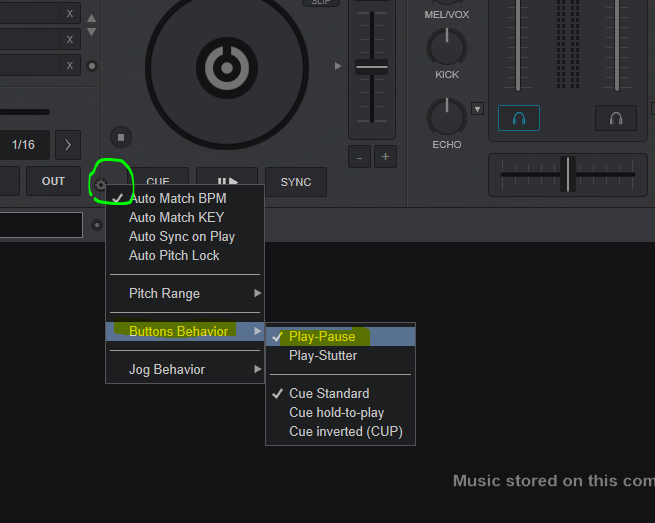
https://virtualdj.com/manuals/virtualdj/interface/decks/deckbasics.html
roy_bad wrote :
In the default version of the Pro skin, how does the DJ pause the currently playing track?
Press the stop button, right over the cue button. Or change play-stutter to play-pause as mentioned .. either way ;-)
发表时间 Mon 01 Mar 21 @ 3:44 pm
roy_bad
Rune,
Thanks a million! Problem solved.
All the best,
Roy
Thanks a million! Problem solved.
All the best,
Roy
发表时间 Mon 01 Mar 21 @ 4:15 pm