


 BOOGIE THE DJ
I don't know if you guys remember the "skip beat" feature in VDJ 5 but I would like to know if it's possible to do it in version 7 and if not is there a way to get the pro version of 5 from vdj? I have friend loves that feature for his chop n screw mixes...thanks in advance
p.s. I found a trial version of 5 but I would like the full version that I can use the serial with
p.s. I found a trial version of 5 but I would like the full version that I can use the serial with
发表时间 Thu 03 Apr 14 @ 2:14 pm
 jakovski
Sorry, cant really remember about it.
Is it to jump 1 or more beat forward or back ?
You could do this with goto +1 or whatever - "-1" "+4".......
Greets, Heiko
Is it to jump 1 or more beat forward or back ?
You could do this with goto +1 or whatever - "-1" "+4".......
Greets, Heiko
发表时间 Thu 03 Apr 14 @ 2:39 pm
BOOGIE THE DJ
it was listed under keyboard shortcuts as skip beat....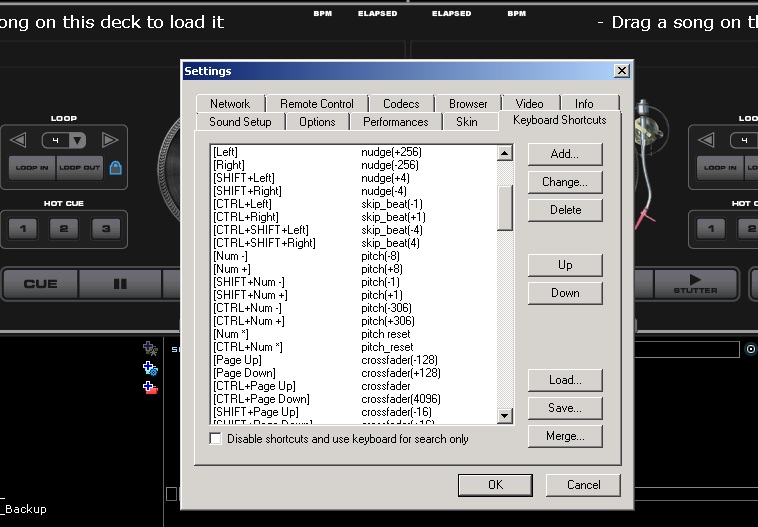
发表时间 Thu 03 Apr 14 @ 3:10 pm
 Dan (djtouchdan)
"goto +4" - as Heiko said will give you the same result.
发表时间 Thu 03 Apr 14 @ 3:36 pm
 icefather
I never remembered this feature. I could see where it would be quite useful.
发表时间 Thu 03 Apr 14 @ 5:14 pm
BOOGIE THE DJ
djtouchdan wrote :
"goto +4" - as Heiko said will give you the same result.
I don't have a clue what "goto+4" is....
发表时间 Thu 03 Apr 14 @ 5:38 pm
BOOGIE THE DJ
icefather wrote :
I never remembered this feature. I could see where it would be quite useful.
It was great for choppin' on snares and hatz....
发表时间 Thu 03 Apr 14 @ 5:40 pm
icefather
ldb1968 wrote :
It was great for choppin' on snares and hatz....
That is exactly what I was thinking.
发表时间 Thu 03 Apr 14 @ 5:54 pm
Dan (djtouchdan)
"goto +4" "goto -4" "goto +1" "goto -1"is the action that i believe and Heiko, directly replaces skip_beat.
Program it as a keyboard shortcut and see if it does what you remember.
Program it as a keyboard shortcut and see if it does what you remember.
发表时间 Thu 03 Apr 14 @ 7:09 pm
BOOGIE THE DJ
djtouchdan wrote :
"goto +4" "goto -4" "goto +1" "goto -1"is the action that i believe and Heiko, directly replaces skip_beat.
Program it as a keyboard shortcut and see if it does what you remember.
Program it as a keyboard shortcut and see if it does what you remember.
my question is how? since the newer version I haven't attempted to program any shortcuts. If you would be so kind as to explain how to do this it would be much appreciated.
发表时间 Fri 04 Apr 14 @ 9:49 am
 PachN
PachN
Go to config -> mappers -> select keyboard mapper form the dropdown box -> press the little green + on the bottom left side of the window.
Press "key learn" button -> press the key you would like to map
Right next to the key learn button the name of your pressed key should now be displayed. e.g "B" or sth.
Right under this textfield is another, labeld "action"
Write this action into that field and then press "ok" or "apply" (not sure how the button on this window is labled)
Action:
+2 indicates to jump/ or skip 2 beats forward. -2 would be 2 beats backwards from the current position.
you could also use 0.125, 0.25, 0.5, 1, 2, 4, 8, 16, 32, 64 ...
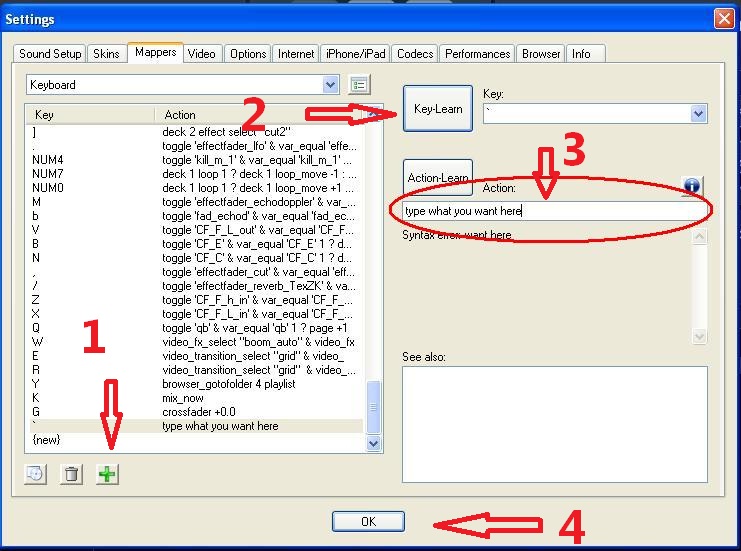
Press "key learn" button -> press the key you would like to map
Right next to the key learn button the name of your pressed key should now be displayed. e.g "B" or sth.
Right under this textfield is another, labeld "action"
Write this action into that field and then press "ok" or "apply" (not sure how the button on this window is labled)
Action:
goto +2
+2 indicates to jump/ or skip 2 beats forward. -2 would be 2 beats backwards from the current position.
you could also use 0.125, 0.25, 0.5, 1, 2, 4, 8, 16, 32, 64 ...
发表时间 Fri 04 Apr 14 @ 9:56 am
BOOGIE THE DJ
PachN wrote :
Go to config -> mappers -> select keyboard mapper form the dropdown box -> press the little green + on the bottom left side of the window.
Press "key learn" button -> press the key you would like to map
Right next to the key learn button the name of your pressed key should now be displayed. e.g "B" or sth.
Right under this textfield is another, labeld "action"
Write this action into that field and then press "ok" or "apply" (not sure how the button on this window is labled)
Action:
+2 indicates to jump/ or skip 2 beats forward. -2 would be 2 beats backwards from the current position.
you could also use 0.125, 0.25, 0.5, 1, 2, 4, 8, 16, 32, 64 ...
Press "key learn" button -> press the key you would like to map
Right next to the key learn button the name of your pressed key should now be displayed. e.g "B" or sth.
Right under this textfield is another, labeld "action"
Write this action into that field and then press "ok" or "apply" (not sure how the button on this window is labled)
Action:
goto +2
+2 indicates to jump/ or skip 2 beats forward. -2 would be 2 beats backwards from the current position.
you could also use 0.125, 0.25, 0.5, 1, 2, 4, 8, 16, 32, 64 ...
Thanks man.....and to everyone else that responded!
发表时间 Fri 04 Apr 14 @ 10:22 am
 Stretchincanada
this feature is awesome an you can jump around I use it when im lost or comming back from the can.. push a button back 64. then I have time to load something else.
发表时间 Fri 04 Apr 14 @ 6:34 pm
 Charlie Wilson
I thought the fast forward and reverse buttons jumped beats in blocks of 4 by pressing them either way, is that not the case?
发表时间 Sat 05 Apr 14 @ 6:12 am