


 DJ VinylTouch
groovindj wrote :
I've not seen them displayed elsewhere - even in the editor, many tracks now just show one anchor, one BPM and a straight blue line. Yes there are sometimes red areas, but even if you zoom in on those areas, it doesn't always show you a BPM value there.
I see what you mean (I just loaded Jimmy Cliff - The Harder They Come and saw there are red areas with no marker), but doesn't that mean the BPM change isn't significant enough to require a marker/actual BPM display change?
It seems like if the BPM change is significant enough (tolerance value unknown), it will display a change (other areas of the song do display the change in the deck info area for me). I would say another explicit setting for that would solve the problem but I wonder if that does more harm than good for the average user.
发表时间 Mon 06 Apr 26 @ 2:28 pm
 PhantomDeejay
DJ Faber Zee wrote :
@phantom
When I DJ, I never mix two tracks with more than a 5 BPM difference. That’s why having the BPM variation clearly visible is important to me. If a track starts at 120 and gradually rises to 125, I need to know that in advance, because it directly impacts how I approach the mix.
When I DJ, I never mix two tracks with more than a 5 BPM difference. That’s why having the BPM variation clearly visible is important to me. If a track starts at 120 and gradually rises to 125, I need to know that in advance, because it directly impacts how I approach the mix.
So, let me ask..
You have a track that's 120BPM, then becomes 122, then falls to 119 and then goes again to 120 BPM
Would you mix a 125 BPM song with it ? Yes or No ?
- Yes, because it's 120 + 5 BPM = 125 BPM max tolerance ?
But what happens if you decide to mix on the part that's 119 ? - No ? Why ? Because at one point in the whole track maybe for a phrase (a few seconds long) the song is 119 BPM and it would be more than your 120+5 BPM max tolerance ?
- Would you decide in realtime whenther or not to mix, and where to mix, based on a BPM value that keeps changing ?
Also why +/-5 BPM and not a value that makes more sense like +/-5% maximum pitch change ?
90 to 95 BPM is much more difference than 140 to 145..
My point is that as a DJ you should plan your mix/mixes as you did before fluid. Before fluid, when you had a track with significant BPM change, either you knew it and scanned the track for multiple BPM or you were caught off guard and by the time you realized it, you tried to mix it by ear or tried your best to salvage a bad mix.
With fluid, if the BPM difference is big enough, you'll get the BPM values displayed as before. Therefore you can anticipate the different BPM. If the BPM difference is sublte, you still get the tidle "warning"
So you know it's "about" that much BPM, and that the software will handle the variations upon mixing.
If I were you and I absolutely wanted to keep that +/-5 BPM rule, whenever I used a fluid track I would change my tolerance to +/-3 BPM just to be "safe" that I would not hit the +/-5 BPM mark during a transition.
But then again, may I ask why ? Why is it so important that during a transition the BPM of the transition is within a 5 BPM range of the original tempo of a song ? (I hope you understand my wording on this one):
The song on deck A is at original tempo and plays at 120 BPM the fluid song mentioned above.
I want to mix a 125 BPM rigid song with it.
It so happens that when I start my mix, the song on deck A is on 119 BPM and the BPM stabilizer stabilizes the transition at 119 BPM instead of 120.
So now the original 125 BPM song is playing at 119 instead of 120.
Does that really matter ? Won't you attempt to restore the song to 125 BPM anyways ?
If not, does the crowd care so much ? Do they have a metronome and come at the booth saying "no no no, you passed the 5 BPM mark" ? :p (just kidding, I hope you understand my sense of humor)
I'm trying to understand why is it so important to see small variations displayed on the BPM readout of the deck, especially when those variations are not actually "real"
A human drummer missing to hit the kick on time by 20ms is actually the difference between 120 and 125BPM tempo.
Hitting the kick with a 5 ms delay will change the BPM from 120 to 118.8 BPM
So, if a drummer makes a mistake, hits the kick late and then he catches up and corrects his mistake does it make sense to see in real time all those little anoyances just to make sure you stay with a certain BPM range ?
I thought we were DJs, not mathematicians :p
PS: I understand that having the intro and the outro BPM displayed somewhere like the browser would be handy for planning a playlist.
However, this doesn't address the fact that on a "fluid" (or multiple BPM) track, you may not actually mix in or mix out the track at the very beggining or very end of the track.
So, a fluid track may show 120 BPM as an outro BPM, but the location you actually select to mix out the track could be 122, or 118 BPM, or even (for multiple BPM tracks) 100.
So in theory it's nice, but in reallity it's less usefull and it still requires you to check the tracks beforehand.
PPS: I'm doing all this arguing because I want us to exchange our views and thoughts and maybe understand each other better. As always there's a reasoning behind the way software functions behave, and I try to share that reasoning with you.
At the same time I'm trying to understand if the reasoning we used makes sense or not, or if we missed something during the process.
I want to make that clear to all of you because English is not my native language and sometimes I worry that the way I write and express myself may seem as harsh or authoriative when in reality it's nothing like that.
Thanks!
发表时间 Mon 06 Apr 26 @ 3:23 pm
 DJ Faber Zee
Dear Phantom,
Thanks for your thorough explanation and for your questions.
I play hip hop, R&B, neo-soul, funk, reggae, dancehall, and soul, spanning from the 60s to today.
About 90% of my sets sit in the 70–100 BPM range, and I’m comfortable working within a ±5 BPM window. What I’d find most useful for FLUID tracks is visibility of three values: minimum, maximum, and average BPM, directly in the library or playlist views.
I don’t usually plan my mixes, except in specific cases, such as wordplay transitions or when layering samples, for example using original 70s samples in contemporary hip hop and R&B.
Having this BPM variation information immediately visible would significantly support my freestyle and improvisational workflow, and likely benefit others as well.
Does that make sense?
Thanks for your thorough explanation and for your questions.
I play hip hop, R&B, neo-soul, funk, reggae, dancehall, and soul, spanning from the 60s to today.
About 90% of my sets sit in the 70–100 BPM range, and I’m comfortable working within a ±5 BPM window. What I’d find most useful for FLUID tracks is visibility of three values: minimum, maximum, and average BPM, directly in the library or playlist views.
I don’t usually plan my mixes, except in specific cases, such as wordplay transitions or when layering samples, for example using original 70s samples in contemporary hip hop and R&B.
Having this BPM variation information immediately visible would significantly support my freestyle and improvisational workflow, and likely benefit others as well.
Does that make sense?
发表时间 Mon 06 Apr 26 @ 5:39 pm
PhantomDeejay
To me, no, not really..
I am a DJ myself. And I as well have my own set of rules for selecting the next track on the fly.
That aside, what I don't understand is how, if you don't know beforehand the structure of a song, you're going to use all those BPM values.. Min/Max BPM doesn't guarantee that min BPM is on the beggining and max at the end. Mean BPM value doesn't mean that you're going to actually mix the song at a place where the mean BPM value applies.
So, to me, it's like turning an artistic choice to a strange mathematical equation problem that you try to solve on the fly..
I'll talk with some examples, of songs that maybe you know. If not, please search for them so that we have a common ground on our talk.
Planet Soul - Set U Free (1995)
The mean BPM is 126. Higher BPM is 126.23 and lower BPM is 98.
How does these numbers help if you don't know the structure of the song ?
Let's take another.
Size 9 - I'm ready (1992)
Mean BPM is 125.9, Lower BPM is 83.3 and higher BPM is 131.88
Does that info tell you anything without knowing the structure of the song ?
Now I'll go the other way:
You see a song that's simply marked as ~122.4 BPM on browser.
It means that the mean BPM is about 122.4
Does that number mean anything without knowing the structure of the song ?
I think no, not really.
Then I tell you that by going from memory, this track doesn't have any suddent BPM changes.
Does that help ?
I think yes, because now you know that you will be mixing something around that BPM area.
The really important question now is this:
For this track, min BPM is 122.45 and max BPM is 122.62.
So, do you really need to see mean=122.4, min=122.45, max=122.62 to understand that you can mix "Bob Marley & The Wailers - Is This Love" as if it was practically a rigid track ?
Finally I give you another song with no more details:
Mean: 115.1 Min:114.62 Max:119.27
What do you get out of these numbers ?
I bet you know the track, but you don't know it's BPM fluctuations by heart (nor you should)
It's "Aretha Franklin - Respect"
Actually the song is almost rigid. It consists of 2 parts with very similar BPM
First part is 114.62, then a brake happens that the drummer does a "mistake" (and thus BPM jumps to 119.27) and then it settles back to 115.65 for the remaining duration of the track.
So, for me, all those extra BPM numbers don't really mean anything, if you don't know the structure of the song.
And if you know the structure of the song, you don't need those extra BPM numbers to help you pick your next track..
At least in my mind! :)
I am a DJ myself. And I as well have my own set of rules for selecting the next track on the fly.
That aside, what I don't understand is how, if you don't know beforehand the structure of a song, you're going to use all those BPM values.. Min/Max BPM doesn't guarantee that min BPM is on the beggining and max at the end. Mean BPM value doesn't mean that you're going to actually mix the song at a place where the mean BPM value applies.
So, to me, it's like turning an artistic choice to a strange mathematical equation problem that you try to solve on the fly..
I'll talk with some examples, of songs that maybe you know. If not, please search for them so that we have a common ground on our talk.
Planet Soul - Set U Free (1995)
The mean BPM is 126. Higher BPM is 126.23 and lower BPM is 98.
How does these numbers help if you don't know the structure of the song ?
Let's take another.
Size 9 - I'm ready (1992)
Mean BPM is 125.9, Lower BPM is 83.3 and higher BPM is 131.88
Does that info tell you anything without knowing the structure of the song ?
Now I'll go the other way:
You see a song that's simply marked as ~122.4 BPM on browser.
It means that the mean BPM is about 122.4
Does that number mean anything without knowing the structure of the song ?
I think no, not really.
Then I tell you that by going from memory, this track doesn't have any suddent BPM changes.
Does that help ?
I think yes, because now you know that you will be mixing something around that BPM area.
The really important question now is this:
For this track, min BPM is 122.45 and max BPM is 122.62.
So, do you really need to see mean=122.4, min=122.45, max=122.62 to understand that you can mix "Bob Marley & The Wailers - Is This Love" as if it was practically a rigid track ?
Finally I give you another song with no more details:
Mean: 115.1 Min:114.62 Max:119.27
What do you get out of these numbers ?
I bet you know the track, but you don't know it's BPM fluctuations by heart (nor you should)
It's "Aretha Franklin - Respect"
Actually the song is almost rigid. It consists of 2 parts with very similar BPM
First part is 114.62, then a brake happens that the drummer does a "mistake" (and thus BPM jumps to 119.27) and then it settles back to 115.65 for the remaining duration of the track.
So, for me, all those extra BPM numbers don't really mean anything, if you don't know the structure of the song.
And if you know the structure of the song, you don't need those extra BPM numbers to help you pick your next track..
At least in my mind! :)
发表时间 Mon 06 Apr 26 @ 7:05 pm
 groovindj
Quote :
Min/Max BPM doesn't guarantee that min BPM is on the beginning and max at the end
....which is why I think a real time BPM readout is important!
It's great if you know the tracks, but we can't know everything, and sometimes it's fun to play things you're not familiar with.
We're not always going to know the structure of the song, so having a live BPM readout (and being able to see the actual BPM figures through the track) is helpful.
Take the previously mentioned EWF example - VDJ makes it look as if (after the slower intro) it has a steady fixed tempo of 126.0 until the end of the track, but that's just not the case. VDJ is giving us false information. If you cued up a track at 126 to mix in near the end, it would be 3 BPM too slow.
发表时间 Mon 06 Apr 26 @ 7:17 pm
 the SOUND INSURGENT
Yall are putting waaaaaaaaaaaaaaaaaay to much thought into this.
Are we in Math class or are you playing music??
A point here, a couple points there are making or having that big of impact on what your mixing or even how you mix.
Do yall even enjoy playing music anymore??
Are we in Math class or are you playing music??
A point here, a couple points there are making or having that big of impact on what your mixing or even how you mix.
Do yall even enjoy playing music anymore??
发表时间 Mon 06 Apr 26 @ 7:37 pm
 Benz Werner
the SOUND INSURGENT wrote :
Yall are putting waaaaaaaaaaaaaaaaaay to much thought into this.
Are we in Math class or are you playing music??
A point here, a couple points there are making or having the big of impact on what your mixing or even how you mix.
Do yall even enjoy playing music anymore??
Are we in Math class or are you playing music??
A point here, a couple points there are making or having the big of impact on what your mixing or even how you mix.
Do yall even enjoy playing music anymore??
+++1
发表时间 Mon 06 Apr 26 @ 7:44 pm
groovindj
Yes of course I enjoy it, or I wouldn't be here after more than 45 years of playing across vinyl, CDs and digital formats. 🙂
I enjoyed it before DJs mixed. I enjoyed it before turntables had pitch controls. I enjoyed it when mixers only had volume controls. I still enjoy it now, but would enjoy it more if I could see more detail of what the track tempo was doing as it progressed. 😍
I used to write detailed tempo info on my vinyl back in the 80s. Sometimes long strings of numbers, courtesy of James Hamiton's meticulously timed Record Mirror reviews.
I enjoyed it before DJs mixed. I enjoyed it before turntables had pitch controls. I enjoyed it when mixers only had volume controls. I still enjoy it now, but would enjoy it more if I could see more detail of what the track tempo was doing as it progressed. 😍
I used to write detailed tempo info on my vinyl back in the 80s. Sometimes long strings of numbers, courtesy of James Hamiton's meticulously timed Record Mirror reviews.
发表时间 Mon 06 Apr 26 @ 7:46 pm
DJ Faber Zee
For me, the current setup is already absolutely fine. Mines are just “nice to have” cosmetic requirements. Let’s see what the devs come up with. They usually don’t disappoint. ✨ have a nice rest of the day!
发表时间 Mon 06 Apr 26 @ 7:56 pm
saladdispenser 
After a few days of trying that new "fluid" BPM analyzer, I am just horrified.
Some tracks I've worked on with the BPM editor in the previous build, tracks in which I'd placed anchors at some points, now just distort whenever it detects a BPM change.
I can't mashup two tracks anymore without hearing one of them change of key slow down make weird audio artifacts etc
It even entirely changed my presets on some tracks I've previously worked on with the old BPM editor ! The beats won't perfectly align anymore while I do a transition or a mashup !
As I speak now, the software froze my computer for several seconds, and VDJ crashed, when I tried to re-analyze a track
This was supposed to make it simplier, while it just made it worst for me
As long as there's no option to switch back to the previous BPM editor and how it used to affect the whole ecosytem, I'm out.
-EDIT-
I figured the previous builds are still available for download.
https://www.virtualdj.com/download/build.html
Version 9004 is the last one before the BPM editor was changed.
Some tracks I've worked on with the BPM editor in the previous build, tracks in which I'd placed anchors at some points, now just distort whenever it detects a BPM change.
I can't mashup two tracks anymore without hearing one of them change of key slow down make weird audio artifacts etc
It even entirely changed my presets on some tracks I've previously worked on with the old BPM editor ! The beats won't perfectly align anymore while I do a transition or a mashup !
As I speak now, the software froze my computer for several seconds, and VDJ crashed, when I tried to re-analyze a track
This was supposed to make it simplier, while it just made it worst for me
As long as there's no option to switch back to the previous BPM editor and how it used to affect the whole ecosytem, I'm out.
-EDIT-
I figured the previous builds are still available for download.
https://www.virtualdj.com/download/build.html
Version 9004 is the last one before the BPM editor was changed.
发表时间 Tue 07 Apr 26 @ 8:18 pm
DJ VinylTouch
So just to understand, you ran a scan on files you manually beatgridded yourself properly? Why would you even do that?
No fluid BPM scanner is perfect - this one works really well imo but you're still supposed to check the work, as a professional, to make sure the job is what you expect before trying to play them back live.
I'm not sure if there is a way to go back to the old manual variable gridding once a fluid analysis is done (devs probably have a say on that) - it's probably still in the database so it should be possible, maybe by just deleting the new format of the fluid analysis and leaving everything else for the track entry.
As for the crash, if you were online, then the devs will have it for analysis. Many of us have never experienced a crash in use since the first EA with the feature dropped, so it's more likely something in your environment.
Rage quit rants don't solve any problems, they just expose problems in being able to communicate. If you want help, the devs and community are here for you, if you don't then that's okay too.
No fluid BPM scanner is perfect - this one works really well imo but you're still supposed to check the work, as a professional, to make sure the job is what you expect before trying to play them back live.
I'm not sure if there is a way to go back to the old manual variable gridding once a fluid analysis is done (devs probably have a say on that) - it's probably still in the database so it should be possible, maybe by just deleting the new format of the fluid analysis and leaving everything else for the track entry.
As for the crash, if you were online, then the devs will have it for analysis. Many of us have never experienced a crash in use since the first EA with the feature dropped, so it's more likely something in your environment.
Rage quit rants don't solve any problems, they just expose problems in being able to communicate. If you want help, the devs and community are here for you, if you don't then that's okay too.
发表时间 Tue 07 Apr 26 @ 8:28 pm
saladdispenser
DJ VinylTouch wrote :
So just to understand, you ran a scan on files you manually beatgridded yourself properly? Why would you even do that?
Because the ones I previously beatgridded myself were nonetheless modified by the new BPM editor without me asking for it. I tried to play one of my set and realized beatgrids I hadn't touched for a long while were changed or completely mapped by the AI, and badly so with that.
DJ VinylTouch wrote :
No fluid BPM scanner is perfect - this one works really well imo but you're still supposed to check the work, as a professional, to make sure the job is what you expect before trying to play them back live.
So far on my side, not even half the tracks tested with this new feature align with the metronome.
Checking the work is what I did, because I have to play live soon, and that checking is what made me realize nights of remapping on a lot of my tracks was lost since the update. I tried to play by the new rules and manually change what the AI didn't get right, but it's either so complicated to me or I manage to make it work sometimes, but the BPM stabilizer produce weird audio artifacts, sometimes mute for a few second a track while the BPM is changing, if a track from deck 2 is trying to synch to the fluidified deck 1 track.
DJ VinylTouch wrote :
Rage quit rants don't solve any problems, they just expose problems in being able to communicate. If you want help, the devs and community are here for you, if you don't then that's okay too.
I've read this sub-topic entirely, nothing was helpful for what I've experienced.
Now, negative feedbacks are almost if not more important to know how to improve something. If I don't voice the downsides, then how am I sure problems that are software/feature/AI related will be fixed?
Now as I write this I've edited my post because I found out I can simply go back to the previous build, which I did. The option is here on this website in case of issues with another build, and I'm taking this option, while watching for a future update which may resolve my issues.
发表时间 Tue 07 Apr 26 @ 9:02 pm
groovindj
It would be helpful to give a few examples of tracks that were OK before, but are not now - and where exactly the problem areas lie.
FYI you don't HAVE to enable the stabilizer. As PhantomDeejay recently posted, it's not intended to be left on all the time.
FYI you don't HAVE to enable the stabilizer. As PhantomDeejay recently posted, it's not intended to be left on all the time.
发表时间 Tue 07 Apr 26 @ 9:19 pm
 kradcliffe
If you have a backup of the database you can recover the old grids which will get you hy.
发表时间 Tue 07 Apr 26 @ 9:19 pm
 jeromeip
I'm quite happy with the fluid analysis, but I wanted to report a terrible result with "Opus / Eric Prydz" track:
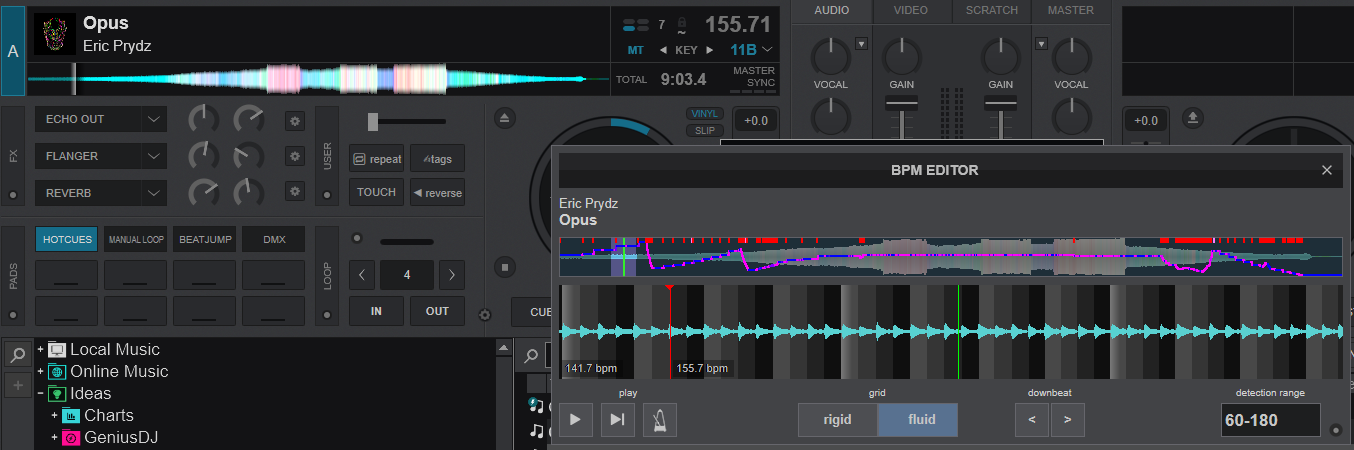
I tried to narrow the analysis to 100-140 BPM range, but it wasn't better.
How should I deal with such a track?
I tried to narrow the analysis to 100-140 BPM range, but it wasn't better.
How should I deal with such a track?
发表时间 Tue 07 Apr 26 @ 9:40 pm
DJ VinylTouch
Polygo Ned wrote :
Because the ones I previously beatgridded myself were nonetheless modified by the new BPM editor without me asking for it.
Because the ones I previously beatgridded myself were nonetheless modified by the new BPM editor without me asking for it.
VirtualDJ doesn't update any grids on previously analysed files unless you explicitly asked it to do that (I have many previously gridded files that are stilltill gridded the same way).
Polygo Ned wrote :
So far on my side, not even half the tracks tested with this new feature align with the metronome.
So far on my side, not even half the tracks tested with this new feature align with the metronome.
Then maybe post the track titles of those so the devs can improve the engine?
Polygo Ned wrote :
I've read this sub-topic entirely, nothing was helpful for what I've experienced.
Now, negative feedbacks are almost if not more important to know how to improve something. If I don't voice the downsides, then how am I sure problems that are software/feature/AI related will be fixed?
I've read this sub-topic entirely, nothing was helpful for what I've experienced.
Now, negative feedbacks are almost if not more important to know how to improve something. If I don't voice the downsides, then how am I sure problems that are software/feature/AI related will be fixed?
Then post your question so persons can help. There is a difference between negative feedback and a threat. The latter does not help your situation, it moreso makes the devs/community want to ignore you.
This forum is pretty much the only DJ one where the Devs are directly involved in direct responses oabout the software and regularly too, and also has some of the smartest community members around wrt using the software and DJing in general. Eveyone wants to help you, and that would only be achieved with positivity towards the situation/members of the forum.
发表时间 Tue 07 Apr 26 @ 10:04 pm
groovindj
@JeromeIP I think you found the best (worst?) possible track to challenge the system LOL 🤣
IMO that's not the sort of track that would be mixed into or out of anyway - at least not the ambient sections.
The centre part is what would be played for the dance floor.
It does seem that the system really struggles to understand things when there's no beat.
IMO that's not the sort of track that would be mixed into or out of anyway - at least not the ambient sections.
The centre part is what would be played for the dance floor.
It does seem that the system really struggles to understand things when there's no beat.
发表时间 Tue 07 Apr 26 @ 10:13 pm
 PANOSV
Honestly (since I know and play the specific track) how would you mix it and you need the fluid analysis? Previous summer That I saw Eric Prydz live and played Opus event he played the original version and mixed it as fade in/out.
Overall I think that this thread is more of "lets pull the Fluid analysis to its limits even though that we would not use it that way" ..Anyway from the previous state that we had the multi scan, fluid is for sure way better in 95% of all the situations and 100% in the way that we were mixing in the past all of the "difficult" tracks..
and I personally am thankfull for it!
Overall I think that this thread is more of "lets pull the Fluid analysis to its limits even though that we would not use it that way" ..Anyway from the previous state that we had the multi scan, fluid is for sure way better in 95% of all the situations and 100% in the way that we were mixing in the past all of the "difficult" tracks..
and I personally am thankfull for it!
发表时间 Wed 08 Apr 26 @ 9:50 am
kradcliffe
Yeah agreed. I had a long play with it last night and it mostly worked well, certainly enough to rely on if needed live at a gig.
Seems it's turning in to a let's find the most difficult tracks you'd never mix anyway with the BPM to 0.0001 percent accuracy competition.
Remember this for "live" use as a DJ and not to picked apart in your studio at home.
Seems it's turning in to a let's find the most difficult tracks you'd never mix anyway with the BPM to 0.0001 percent accuracy competition.
Remember this for "live" use as a DJ and not to picked apart in your studio at home.
发表时间 Wed 08 Apr 26 @ 10:23 am
PhantomDeejay
Rember:
Fluid is to be used to help you mix difficult parts where the song(s) drift (if you have to mix on those parts)
This means that most likely at the place you're mixing you have either a steady tempo (that may be different from the tempo of another location of the song), or a tempo that's gradually drifting/changing (and not being a roller coaster). It also means that most likely you'll try to make a quick mix, and not keep mixing for 64 or 128 beats as if the track(s) were 100% rigid.
Fluid is not meant to be used as a tool to create realtime perfect mushups of drifting tracks that will stick to a 100% stable CBG grid.
I suppose yes it can be used for that too, but it's not what it was designed for and therefore limitations exist. You need to try beforehand, and decide if the result is good or not. But still this is not the primary function of Fluid. Rather a sideshow of it..
Finally if you "stabilize" a fluid track for long enough, of course and it will sound strange, especially if the drifting and/or tempo changes of the original track are significant. It's what people have been talking about warping since Ableton made that a thing..
BPM stabilizer is just a limited scope warp mechanism. So yes, stabilizing an entire track to a given BPM should be used extremely wisely.
Fluid is to be used to help you mix difficult parts where the song(s) drift (if you have to mix on those parts)
This means that most likely at the place you're mixing you have either a steady tempo (that may be different from the tempo of another location of the song), or a tempo that's gradually drifting/changing (and not being a roller coaster). It also means that most likely you'll try to make a quick mix, and not keep mixing for 64 or 128 beats as if the track(s) were 100% rigid.
Fluid is not meant to be used as a tool to create realtime perfect mushups of drifting tracks that will stick to a 100% stable CBG grid.
I suppose yes it can be used for that too, but it's not what it was designed for and therefore limitations exist. You need to try beforehand, and decide if the result is good or not. But still this is not the primary function of Fluid. Rather a sideshow of it..
Finally if you "stabilize" a fluid track for long enough, of course and it will sound strange, especially if the drifting and/or tempo changes of the original track are significant. It's what people have been talking about warping since Ableton made that a thing..
BPM stabilizer is just a limited scope warp mechanism. So yes, stabilizing an entire track to a given BPM should be used extremely wisely.
发表时间 Wed 08 Apr 26 @ 10:54 am
