


 zz06terry
I am trying to change Video Skins setting to {None}. Everytime I change it from {Live} to {None} and exit the Graphical Interface page then return to Graphical Interface page it has reverted back to {Live}. Any way to make it stay on (None}?
发表时间 Mon 31 Jul 23 @ 4:21 pm
 wildcountryclub
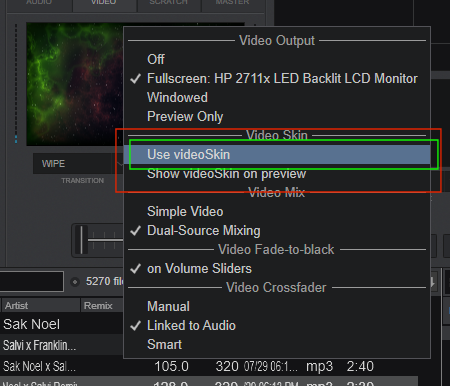
not doing it here except to highlight it but until you click on it to activate it then it's not a big deal - unless it IS activating it on screen - in which case see second pic.
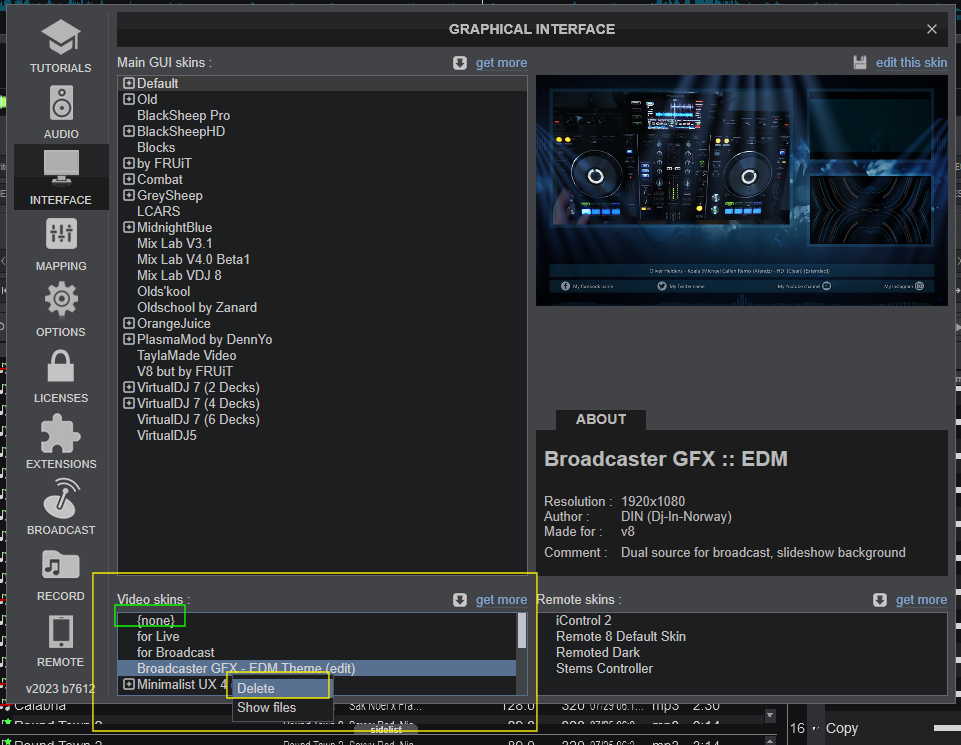
i make sure the live skin is set to none and then make sure i don't drag the cursor arrow over any of the others to highlight them - you can also right-click and delete them if you want.
can also turn them off by right clicking the video preview screen or clicking the small icon next to it to open the Video menu
i make sure the live skin is set to none and then make sure i don't drag the cursor arrow over any of the others to highlight them - you can also right-click and delete them if you want.
can also turn them off by right clicking the video preview screen or clicking the small icon next to it to open the Video menu
发表时间 Tue 01 Aug 23 @ 4:47 am